
2Slides Team
17 min read

To automate social media carousels, keep your topics in a Google Sheet, Notion database, or Airtable base, let Claude or OpenAI turn each new row into a 7-slide outline plus captions, and have n8n or Make call the 2Slides API endpoint create-pdf-slides with aspectRatio: "4:5" or "9:16". Poll jobs/{id}, then download the PDF and per-page PNGs. A 7-page 2K carousel costs 710 credits, roughly $1.42 to $1.78, and the recipe fits content teams that publish several carousels a week without a designer in the loop.
Key takeaways
create-pdf-slides call produces a 7-page carousel as a PDF plus per-page PNGs at 2K for 710 credits (10 planning credits + 100 credits per page).aspectRatio accepts any w:h string: 4:5 for the LinkedIn and Instagram feed, 9:16 for Stories, Reels, and TikTok, 1:1 for square posts.create-like-this takes a referenceImageUrl of one brand slide and derives the full design system from it, so every carousel in a series stays consistent.This recipe is for content marketers and marketing ops engineers who already run n8n, Make, or Zapier, have 30 to 300 carousel ideas sitting in a spreadsheet, and lose days of designer time every month turning them into slides. It also fits agencies that produce carousels for several client brands and need each brand to keep its own look.
Do not use it if every carousel needs hand-placed product screenshots or charts a designer edits in Figma. In that case the automation saves you the first draft at most, and an editable PPTX from Fast PPT is the better starting point.
| Step | Tool | What happens | 2Slides endpoint / credits |
|---|---|---|---|
| 1 | Google Sheets, Notion, or Airtable | New row with topic, channel (LinkedIn, Instagram, Stories), status = queued | None |
| 2 | Claude or OpenAI node | Writes a 7-slide outline (hook, 5 body slides, CTA) plus caption and hashtags as JSON | None |
| 3 | HTTP Request node | Submits the outline with aspectRatio "4:5" or "9:16", page: 7, resolution: "2K", mode: "async" | POST /api/v1/slides/create-pdf-slides, 710 credits per 7-page deck |
| 4 | Wait node + HTTP Request node | Polls every 8 seconds until status is success or failed | GET /api/v1/jobs/{id}, free, 10 req/min |
| 5 | HTTP Request node | Downloads the PDF from downloadUrl and the per-page PNG ZIP | POST /api/v1/slides/download-slides-pages-voices, free |
| 6 | Optional | Adds a narrator voice, then renders a 9:16 MP4 in the Workspace | generate-narration, 210 credits per page; video export 20 credits per page |
| 7 | Google Drive, Slack | Uploads assets, posts for review, writes links and status = ready to the row | None |
2Slides exposes two ways to make slides through the API. generate (Fast PPT) fills a designed template and returns an editable PPTX in about 30 seconds. create-pdf-slides (the Nano Banana image-designed pipeline) draws every page from your prompt and returns a PDF plus per-page images.
Carousels need the second pipeline for three reasons. It accepts a custom aspectRatio, which Fast PPT does not. It returns per-page PNGs, which is what LinkedIn and Instagram ingest. And its jobs can be narrated and turned into MP4, which Fast PPT jobs cannot.
Before you wire anything, run two or three prompts by hand on the Nano Banana product page. It exposes the same prompt box and page count the API uses, so you can settle your designStyle wording with a human in the loop and only then automate it.
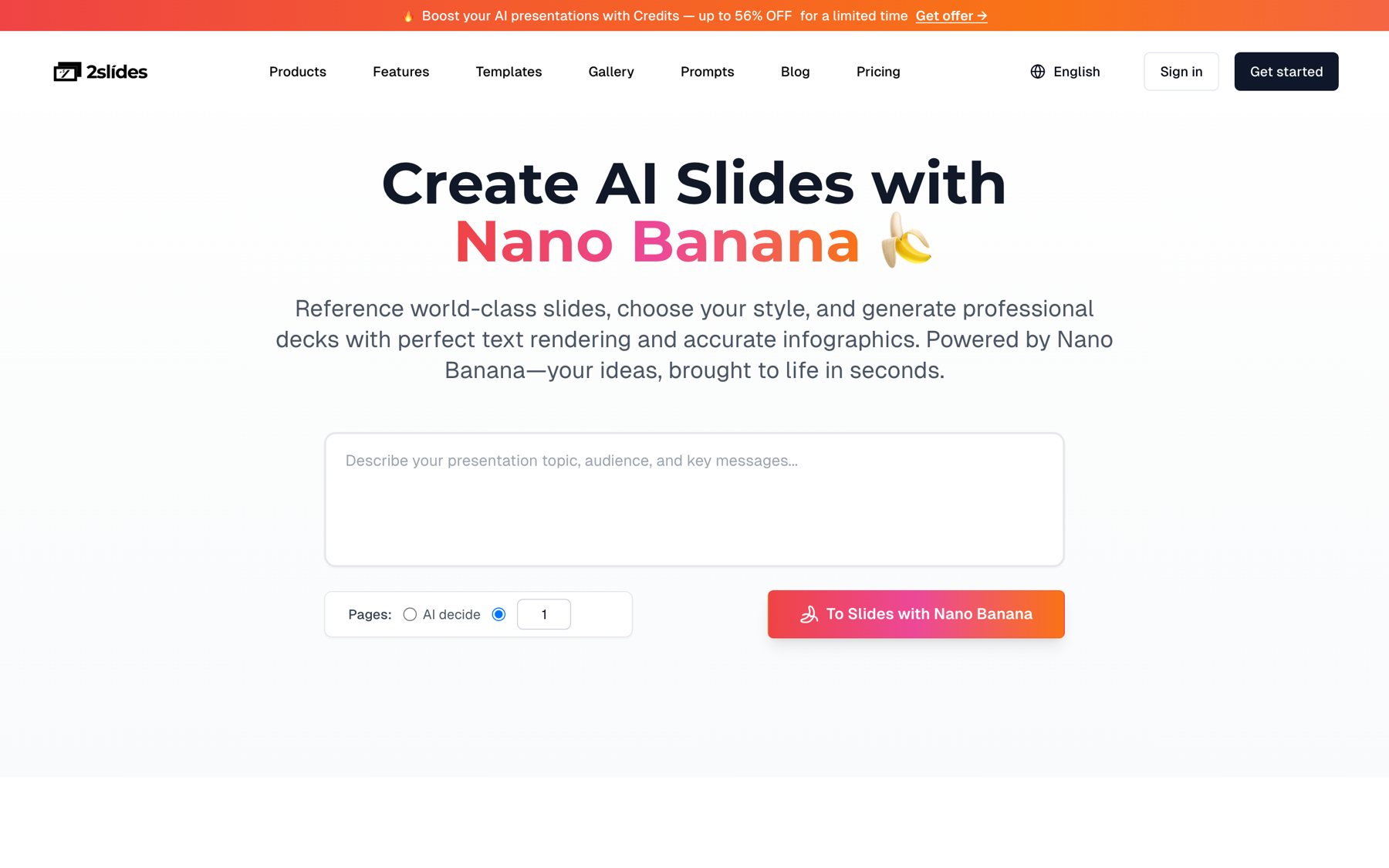
For a fair comparison: Gamma's developer docs publish a similar Make + Claude carousel recipe, but its API keys require a Pro plan, while 2Slides API keys work on any account, including a new one with 500 free credits. 2Slides is our product, so test both against your own brand and budget.
The LLM step is where the topic list to carousel transformation happens. Ask Claude or OpenAI for structured JSON, not prose, so the next node can read it without regex:
You write LinkedIn and Instagram carousels for {{brand}}.
Topic: {{topic}}
Audience: {{audience}}
Return JSON only:
{
  "slides": [
    { "n": 1, "title": "<hook, max 8 words>", "body": "<one line>" },
    ... exactly 7 slides; slide 7 is the call to action ...
  ],
  "caption": "<120 to 200 words, no hashtags>",
  "hashtags": ["<5 to 8 tags>"]
}
Rules: one idea per slide, no bullet lists inside a slide, plain language.
Then flatten the slides into the userInput string 2Slides expects. Keep each slide to a headline and one supporting line; 7 dense slides at 4:5 get cramped fast. Set contentDetail: "concise" for the same reason.
// n8n Code node (or any Node 20 script): build the 2Slides payload from the LLM JSON
const plan = JSON.parse($json.llmOutput);
const userInput = plan.slides
  .map((s) => `Slide ${s.n}: ${s.title}\n${s.body}`)
  .join("\n\n");

const aspectRatio = $json.channel === "Stories" ? "9:16" : "4:5";

return [{ json: { userInput, aspectRatio, caption: plan.caption, hashtags: plan.hashtags } }];
Store caption and hashtags back on the row; the person scheduling the post needs them next to the PNGs.
Create an API key at 2slides.com/api under the API Keys tab. New accounts start with 500 free credits. Put the key in your automation tool's credential store and send it as Authorization: Bearer $SLIDES_API_KEY. Never place it in a browser-side script or a public Sheet cell.
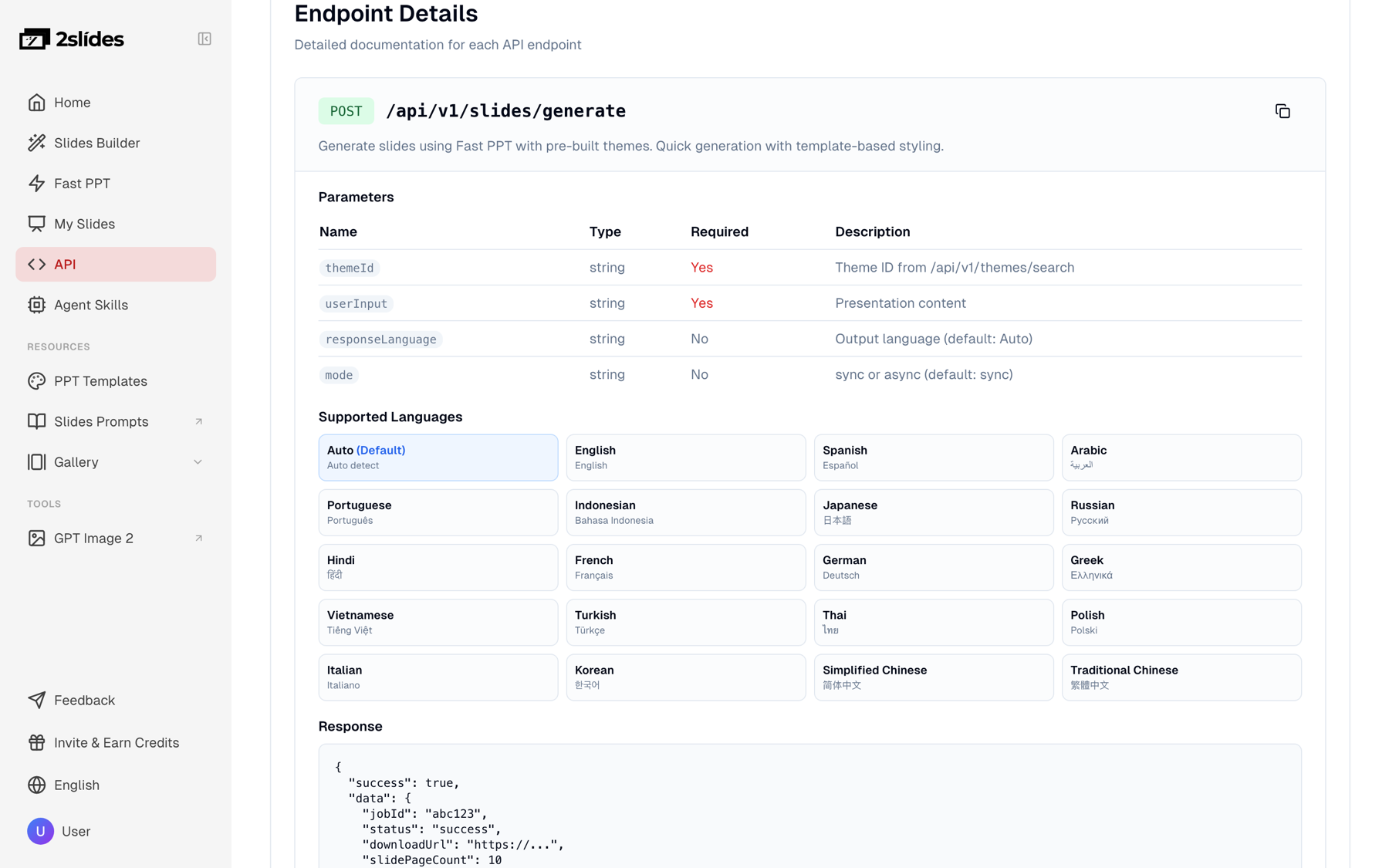
responseLanguage, not a code.
The submission call for a LinkedIn feed carousel looks like this. designStyle is free text; be specific about background, accent color, typography, and what to avoid.
curl -X POST https://2slides.com/api/v1/slides/create-pdf-slides \
  -H "Authorization: Bearer $SLIDES_API_KEY" \
  -H "Content-Type: application/json" \
  -d '{
    "userInput": "Slide 1: 5 onboarding emails every SaaS should send\nMost trials churn before day 3. These five fix that.\n\nSlide 2: Day 0, the welcome\nOne job: get them to the first aha moment.\n\nSlide 3: Day 1, the quick win\nShow one feature, one outcome, one button.\n\nSlide 4: Day 3, the social proof\nA customer quote and a number.\n\nSlide 5: Day 5, the blocker check\nAsk what stopped them. Reply personally.\n\nSlide 6: Day 7, the decision\nRestate value, then the price.\n\nSlide 7: Save this carousel\nFollow for the full sequence templates.",
    "designStyle": "Bold editorial carousel for LinkedIn. Off-white background, one deep navy accent, oversized serif headline on each slide, small sans-serif body line, thin page counter top-right, brand mark bottom-left. No stock photos, no gradients.",
    "aspectRatio": "4:5",
    "resolution": "2K",
    "page": 7,
    "contentDetail": "concise",
    "imageModel": "gemini-3-pro-image",
    "responseLanguage": "English",
    "mode": "async"
  }'
The response is { "jobId": "..." }. For a Stories or TikTok version, change aspectRatio to "9:16" and ask for the headline higher up in designStyle so platform UI does not cover it. resolution: "2K" is the default and costs the same 100 credits per page as 512px and 1K; 4K doubles that to 200 credits per page.
In n8n the whole flow is eight nodes. The same shape works in Make with its HTTP and Sleep modules (see Make's help center), and the n8n docs cover HTTP Request credentials.
status = queueduserInput, pick aspectRatio from the channel columnPOST /api/v1/slides/create-pdf-slides with mode: "async", save jobId to the rowGET /api/v1/jobs/{jobId}; an IF node loops back to the Wait node while status is pending or processingdownloadUrl, then POST /api/v1/slides/download-slides-pages-voices for the PNG ZIPstatus = readyIf you would rather own the loop in code, here is the same sequence as a dependency-free Node 20 script.
// Node 20+. Run server-side; the key never leaves your environment.
import { writeFile } from "node:fs/promises";

const BASE = "https://2slides.com";
const headers = {
  Authorization: `Bearer ${process.env.SLIDES_API_KEY}`,
  "Content-Type": "application/json",
};
const sleep = (ms) => new Promise((r) => setTimeout(r, ms));

async function submitCarousel(row) {
  const res = await fetch(`${BASE}/api/v1/slides/create-pdf-slides`, {
    method: "POST",
    headers,
    body: JSON.stringify({
      userInput: row.userInput,
      designStyle: row.designStyle,
      aspectRatio: row.aspectRatio, // "4:5" or "9:16"
      resolution: "2K",
      page: 7,
      contentDetail: "concise",
      responseLanguage: "English",
      mode: "async",
    }),
  });
  if (!res.ok) throw new Error(`submit failed: ${res.status} ${await res.text()}`);
  const { jobId } = await res.json();
  return jobId;
}

async function waitForJob(jobId) {
  for (;;) {
    const res = await fetch(`${BASE}/api/v1/jobs/${jobId}`, { headers });
    const job = await res.json();
    if (job.status === "success") return job;
    if (job.status === "failed") throw new Error(`job ${jobId} failed`);
    await sleep(8000); // 5 to 10 s keeps you under the 10 req/min limit on jobs/{id}
  }
}

async function downloadAssets(jobId, job, slug) {
  const pdf = await fetch(job.downloadUrl);
  await writeFile(`${slug}.pdf`, Buffer.from(await pdf.arrayBuffer()));

  const zip = await fetch(`${BASE}/api/v1/slides/download-slides-pages-voices`, {
    method: "POST",
    headers,
    body: JSON.stringify({ jobId }),
  });
  await writeFile(`${slug}-pages.zip`, Buffer.from(await zip.arrayBuffer()));
}

// rows come from your Sheet/Notion/Airtable export after the LLM step
for (const row of rows) {
  const jobId = await submitCarousel(row);
  const job = await waitForJob(jobId);
  await downloadAssets(jobId, job, row.slug);
  await sleep(10_000); // stay under 6 submissions per minute per key
}
Unzip the pages ZIP and you have 7 PNGs at the 4:5 or 9:16 ratio you requested. Those are the files you upload, in order, to the LinkedIn document post or the Instagram multi-image post.
The same job that produced your carousel can be narrated. generate-narration accepts the jobId from create-pdf-slides or create-like-this and writes a script plus a voice track for every page. Pick one of the 30 voices (Zephyr, Puck, Charon, Kore, Aoede, Leda) and keep contentMode: "concise" so each page runs a few seconds.
curl -X POST https://2slides.com/api/v1/slides/generate-narration \
  -H "Authorization: Bearer $SLIDES_API_KEY" \
  -H "Content-Type: application/json" \
  -d '{
    "jobId": "JOB_ID_FROM_STEP_3",
    "mode": "single",
    "speakerName": "Host",
    "voice": "Kore",
    "contentMode": "concise",
    "includeIntro": false
  }'
Narration is async only, so poll jobs/{id} the same way. When it finishes, download-slides-pages-voices returns a ZIP with the per-page PNGs and a WAV per page, which an FFmpeg step can stitch into a vertical video. If you would rather not run FFmpeg, open the job in the 2Slides Workspace and use Export → Generate Video, which renders a 1080×1920 H.264 MP4 in the browser for 20 credits per page.
For pacing, hooks, and caption timing in vertical video, read the faceless educational shorts playbook and the narration and video best practices post.
designStyle text gets you close to a brand look, but text is ambiguous. If your team has one slide everyone agrees looks right, switch the submission to create-like-this and pass it as referenceImageUrl. 2Slides derives the whole design system (palette, type scale, layout grid) from the reference, so carousel 40 matches carousel 1. Cost and limits are identical to create-pdf-slides.
curl -X POST https://2slides.com/api/v1/slides/create-like-this \
  -H "Authorization: Bearer $SLIDES_API_KEY" \
  -H "Content-Type: application/json" \
  -d '{
    "userInput": "Slide 1: 5 onboarding emails every SaaS should send ... Slide 7: Save this carousel",
    "referenceImageUrl": "https://assets.yourbrand.com/carousel-style-reference.png",
    "aspectRatio": "4:5",
    "resolution": "2K",
    "page": 7,
    "contentDetail": "concise",
    "mode": "async"
  }'
The reference must be a public URL: your CDN, an S3 or R2 bucket with public read, or a share link that resolves without login. Keep one reference per brand in a column of your topic sheet so the Code node can pick it per row.
If you do not have a brand slide yet, the 2Slides Gallery hosts real-world decks you can use as design inspiration or pass directly as referenceImageUrl. The images below come from two of those Gallery decks. They are not API output from this workflow; they are the kind of source style you would point the API at.

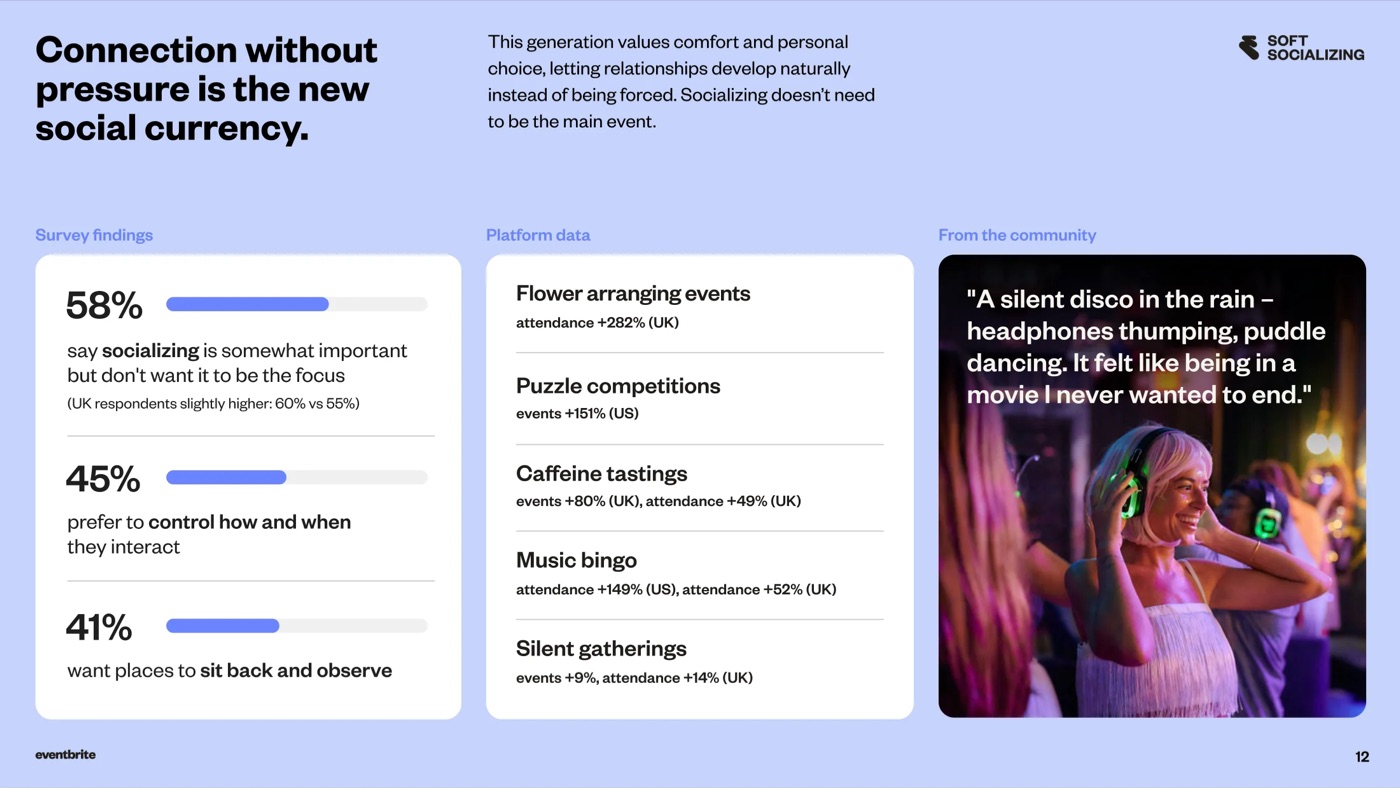
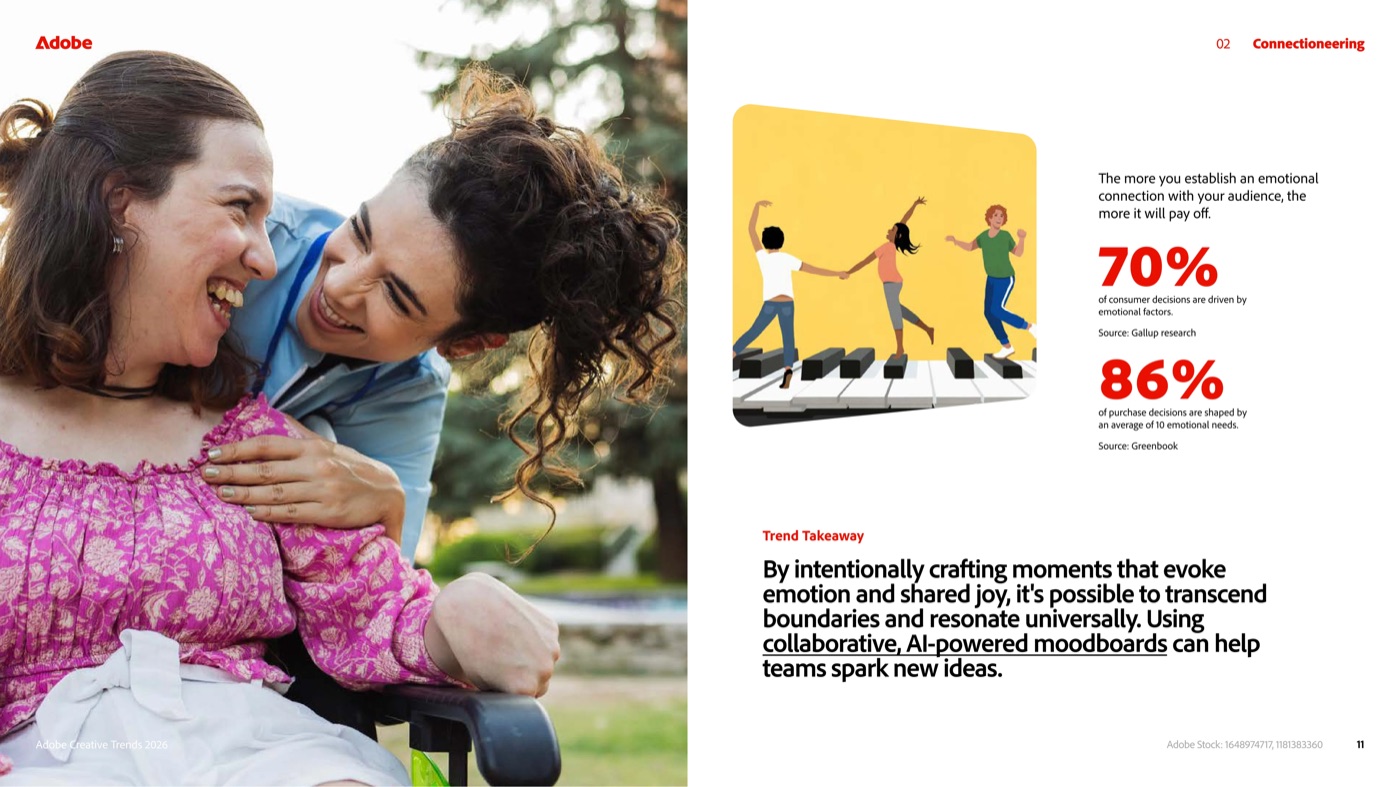
Choose a reference with one clear headline, a plain background, and a visible brand mark. Busy references with photos and several charts produce carousels that are hard to read at phone size.
Each 7-page carousel at 2K is 10 planning credits + 7 × 100 = 710 credits. Credits cost $0.0025 each in the $5 pack (2,000 credits) and $0.002 each in the $80 pack (40,000 credits). PNG downloads and polling are free.
| Volume | Credits per month | Pack that fits | USD per month | USD per carousel |
|---|---|---|---|---|
| 20 carousels, 7 pages, 2K, no narration | 14,200 | $42.50 for 20,000 credits | ≈ $30.18 | ≈ $1.51 |
| 500 carousels, 7 pages, 2K, no narration | 355,000 | 9 × $80 for 40,000 credits | ≈ $710 at $0.002 per credit | ≈ $1.42 |
| Add narration to one 7-page carousel | +1,470 | ≈ $2.94 to $3.68 | ||
| Add Workspace video export to one 7-page carousel | +140 | ≈ $0.28 to $0.35 |
The optional Pro subscription includes 10,000 credits per month ($12.50 per month on promo, $25 list), which covers 14 carousels a month. The 500 free signup credits do not cover a full 7-page deck, so test with a 3-page run (310 credits) first. See the batch playbook for marketing teams if you are sizing this for several brands.
| Need | Use | Why |
|---|---|---|
| 4:5 or 9:16 output, per-page PNGs, narration, MP4 | create-pdf-slides or create-like-this | The image-designed pipeline accepts aspectRatio and can be narrated; Fast PPT cannot |
| Editable PPTX for a webinar or sales deck on the same topic | generate (Fast PPT) | 10 credits per page, native PPTX from 1,500+ templates via themes/search |
| One locked brand look across hundreds of carousels | create-like-this with referenceImageUrl | Derives the design system from one image instead of interpreting prose |
| Quick internal draft before design review | create-pdf-slides at resolution: "512px" | Same 100 credits per page as 2K; regenerate at 2K once approved |
jobs/{id}. Put a Wait node between submissions and poll no faster than every 5 seconds.generate-narration rejects jobs from generate. Only create-pdf-slides and create-like-this jobs can be narrated or exported to MP4.page: 0 and expecting 7 slides. page: 0 means auto-detect from the content, which can return 4 or 12 pages. Set page: 7 explicitly so cost and layout are predictable.responseLanguage takes a language name such as "Spanish" or "Simplified Chinese", not "es" or "zh-CN".userInput. The image model will try to fit it. Have the LLM step reduce it to 7 headlines with one line each before you submit.Yes, for the first draft and for most recurring formats. An LLM writes the 7-slide outline, create-pdf-slides draws the slides in your designStyle or from a referenceImageUrl, and n8n delivers the PNGs to a review channel. A person still approves each carousel before posting, but the design and layout work is done by the time they see it.
Use aspectRatio: "4:5" for the LinkedIn feed and the Instagram feed carousel, since both display portrait cards at that ratio. Use "9:16" for Instagram Stories, Reels covers, and TikTok slideshows. "1:1" works if you need one square set for every platform. The parameter accepts any w:h string, so you can add ratios later without changing the workflow.
A 7-page carousel at 2K resolution costs 710 credits: 10 planning credits plus 100 credits per page. That is about $1.78 on the $5 pack and $1.42 on the $80 pack. Polling and PNG downloads are free. Narration adds 210 credits per page, and rendering a video in the Workspace adds 20 credits per page.
Yes. Call generate-narration with the carousel's jobId, choose one of 30 voices, and poll until it succeeds. Then either download the PNG and WAV ZIP from download-slides-pages-voices and stitch it with FFmpeg, or open the job in the 2Slides Workspace and use Export → Generate Video for a 1080×1920 MP4. Narration only works on create-pdf-slides and create-like-this jobs.
Yes. Every step is a plain HTTPS call with a Bearer token, so Make's HTTP module and Zapier's Webhooks action can submit, poll, and download the same way. The one requirement is a loop that waits 5 to 10 seconds between jobs/{id} checks. n8n and Make handle that natively; in Zapier you may prefer a Delay step and a second Zap for the poll.
Create stunning AI-powered presentations in seconds. Transform your ideas into professional slides with 2slides AI Agent.
Try For FreeYour AI Agent for slides. Save time, shine faster with intelligent presentation creation.




© 2026 2slides. All rights reserved.