2Slides Team
16 min read

Nano Banana 2.1 (gemini-nano-banana-2.1) is Google's current Flash-tier image model. It became generally available on October 6, 2026 and replaces Nano Banana 2. For presentation slides it is the cheaper choice: in our test a 2K, 16:9 slide image cost about $0.05 to $0.07 on Nano Banana 2.1, against $0.10 on Nano Banana 2 and $0.14 on Nano Banana Pro. Text accuracy was close: Pro rendered all five test slides exactly, and Nano Banana 2.1 got four or five out of five depending on the thinking setting. Nano Banana 2.1 was not faster than Pro at default settings (59 seconds per slide against 54), and it was slower than the model it replaces (23 seconds).
We generated 20 slide images on November 12, 2026: five slide prompts on three models, plus a second pass on Nano Banana 2.1 with thinking set to minimal. Every number in the test sections below comes from those 20 API responses. Prices and specifications come from Google's own pages, linked next to each claim and read on the same day.
Nano Banana 2.1 is an update to Nano Banana 2 (Gemini 3.1 Flash Image), and Google now recommends it for all new projects. The older gemini-3.1-flash-image model was marked deprecated on the day 2.1 launched, with no shutdown date announced.
| Nano Banana 2.1 | Nano Banana 2 | Nano Banana Pro | |
|---|---|---|---|
| Model ID | gemini-nano-banana-2.1 | gemini-3.1-flash-image | gemini-3-pro-image |
| Status (Nov 12, 2026) | GA since October 6, 2026 | Deprecated, no shutdown date | GA |
| Output resolutions | 1K, 2K, 4K (default 1K) | 512px, 1K, 2K, 4K | 1K, 2K, 4K |
| Wide ratios (1:4, 4:1, 1:8, 8:1) | Yes | Yes | No |
| Reference images | Up to 14 (10 objects, 4 characters) | Up to 14 (10 objects, 4 characters) | Up to 14 (6 objects, 5 characters, 3 style) |
| Thinking | minimal, medium (default), high | Yes | Yes |
| Search grounding | Web and image search | Web and image search | Web search |
| Image output price | $30 per 1M tokens | $60 per 1M tokens | $120 per 1M tokens |
Sources: Google's Nano Banana 2.1 model page, Gemini API release notes (entry for October 6, 2026), deprecations page, image generation guide and pricing page, all read on November 12, 2026.
Two details matter if you are migrating from Nano Banana 2. Nano Banana 2.1 does not support the 512px size, so a pipeline that requests 512px thumbnails has to move to 1K. And on Google Cloud the model is listed for the global location only (Google Cloud model page). Our first requests to regional endpoints returned 404; the same key worked once the request named the global location.
Nano Banana 2.1 costs $0.0336 for a 1K image, $0.0504 for a 2K image and $0.113 for a 4K image at Google's list price. That is half the price of Nano Banana 2 and well under half the price of Nano Banana Pro.
| Per image, list price | Nano Banana 2.1 | Nano Banana 2 | Nano Banana Pro |
|---|---|---|---|
| 1K | $0.0336 | $0.067 | $0.134 |
| 2K | $0.0504 | $0.101 | $0.134 |
| 4K | $0.113 | $0.151 | $0.24 |
| Batch API, 2K | $0.0252 | not listed | not listed |
Source: Gemini API pricing, November 12, 2026. There is no free tier for any of the three models in the API.
The per-image figures count only the image tokens. Nano Banana 2.1 thinks before it draws, and the pricing page lists thinking output at $7.50 per 1M tokens. In our five default-setting requests the API reported between 969 and 2,680 thinking tokens per image, 1,640 on average.
| What our 2K slide images actually used | Image tokens | Thinking tokens (avg) | Cost per slide at list price | 10-slide deck |
|---|---|---|---|---|
| Nano Banana 2.1, default thinking | 1,680 | 1,640 | $0.063 (range $0.059 to $0.071) | $0.63 |
| Nano Banana 2.1, minimal thinking | 1,680 | 0 | $0.050 | $0.50 |
| Nano Banana 2 | 1,680 | 0 | $0.101 | $1.01 |
| Nano Banana Pro | 1,120 | 339 | $0.139 | $1.39 |
These costs are calculated from the usageMetadata in each response and Google's list prices, not read from an invoice. One of the five Nano Banana 2.1 default images reported 1,754 image tokens instead of 1,680. Prompt tokens added less than $0.001 per image on every model.
So the real saving against Pro is about 55% at default settings and 64% with minimal thinking, not the 62% the list prices alone suggest.
We sent five slide prompts to each model through the same Google Cloud project, one request at a time with a 15-second pause, at 16:9 and 2K (2752 × 1536 pixels). Each prompt spelled out the exact text the slide had to contain.
| # | Slide | What it checks |
|---|---|---|
| 1 | Bar chart: title, four labelled bars with values, small source line | Numbers, proportional bars, small text |
| 2 | Bullet slide: title, five full-sentence bullets, small footer | Longer text, small footer text |
| 3 | Five-step process diagram with a label and caption per step | Layout plus 15 short text strings |
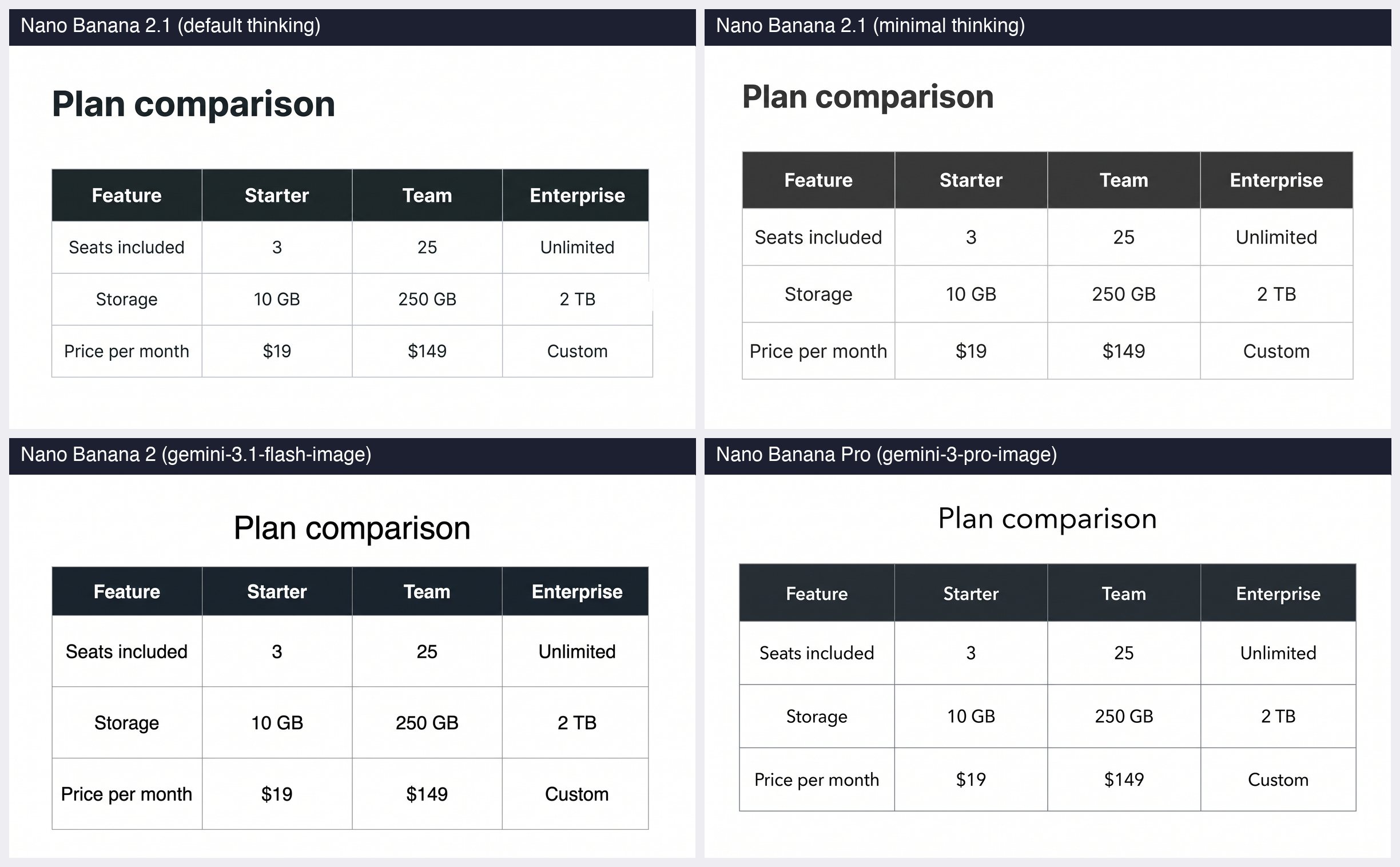
| 4 | Comparison table, four columns by four rows | Grid alignment, 16 cells |
| 5 | Title slide in Simplified Chinese with subtitle and footer | Non-Latin text |
Here is prompt 2 in full, so you can rerun it:
Create one 16:9 presentation slide. Minimal style: off-white background, black text, generous margins, no images.
Title, exactly: "Why customers churn in the first 90 days"
Then exactly five bullet points, each on one line, with this exact wording:
• Onboarding takes 11 days on average; the target is 3
• 42% of new accounts never invite a second user
• Support tickets peak in week 2, then drop by half
• Accounts that connect an integration retain at 91%
• Pricing page visits triple before a cancellation
Bottom right footer in small gray text, exactly: "Customer Success review · November 2026 · Confidential"
No other text.
What this test does not cover: each prompt ran once per setting, so 20 images in total. That is enough to see how the models behave and what they cost, and too few to rank them statistically. We did not test image editing, reference images, 4K output or search grounding. We checked the text in every image by eye at full resolution.
Nano Banana Pro and Nano Banana 2.1 with minimal thinking rendered all five slides with every character correct. Nano Banana 2.1 at default settings and Nano Banana 2 each made one error.
| Slide | Nano Banana 2.1 (default) | Nano Banana 2.1 (minimal) | Nano Banana 2 | Nano Banana Pro |
|---|---|---|---|---|
| 1. Bar chart | Correct | Correct (added gridlines we did not ask for) | Correct | Correct |
| 2. Bullets | Footer typo: "Confiddential" | Correct | Fifth bullet printed twice, second copy smeared | Correct |
| 3. Process | Correct | Correct text; step numbers shown twice | Correct | Correct |
| 4. Table | Correct text; right table border misaligned | Correct | Correct | Correct |
| 5. Chinese title | Correct | Correct | Correct | Correct |
| Slides with exact text | 4 of 5 | 5 of 5 | 4 of 5 | 5 of 5 |
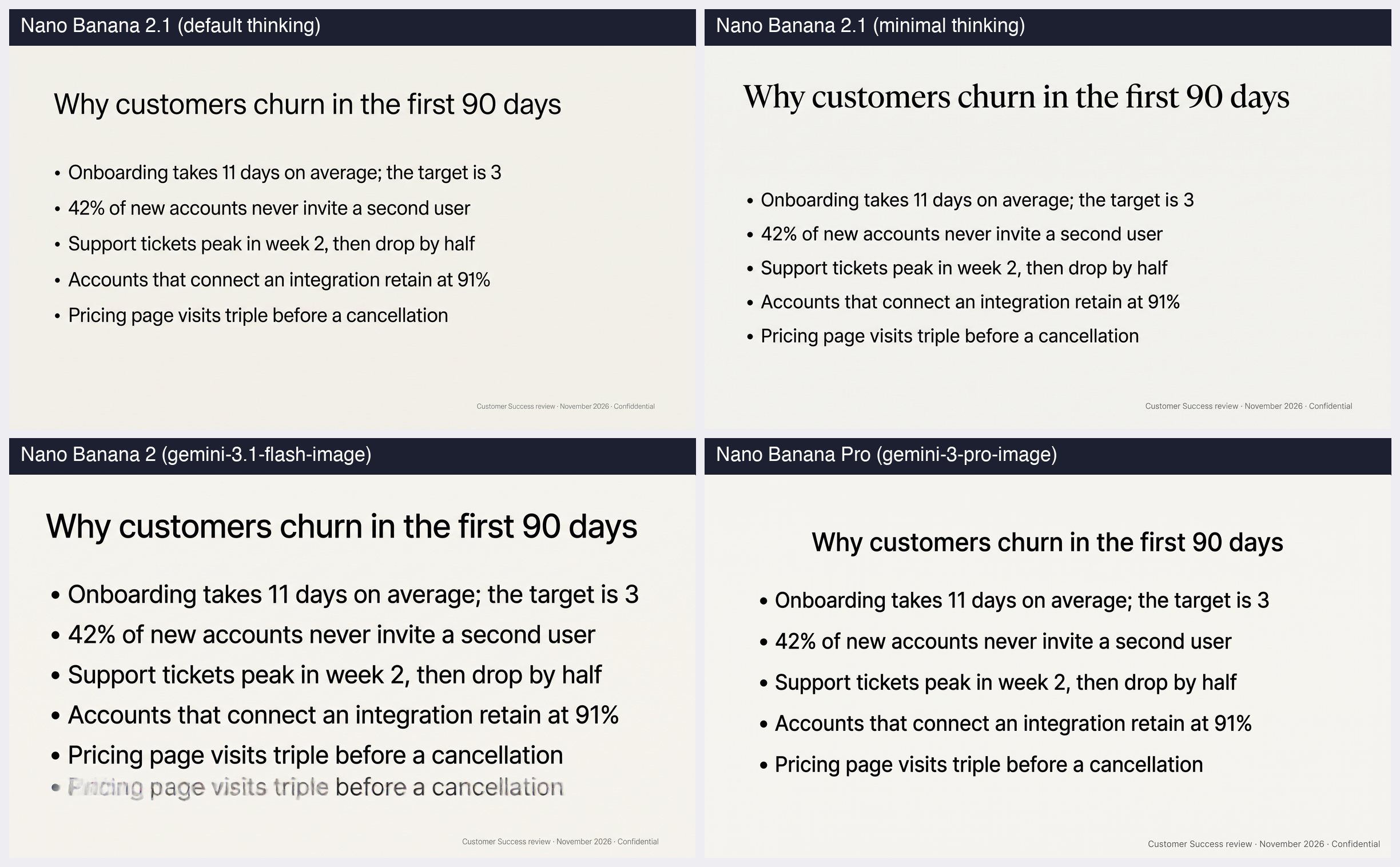
The bullet slide separated the models. Nano Banana 2 printed the last bullet twice, and the copy came out blurred:

Nano Banana 2.1 fixed that failure and then misspelled one word in the smallest text on the slide. That matches what Google says about its own model. The Nano Banana 2.1 model card lists "poor text rendering in small text" and long paragraphs among the known limitations. For slides, this means footers, source lines and chart annotations are where you should look first.
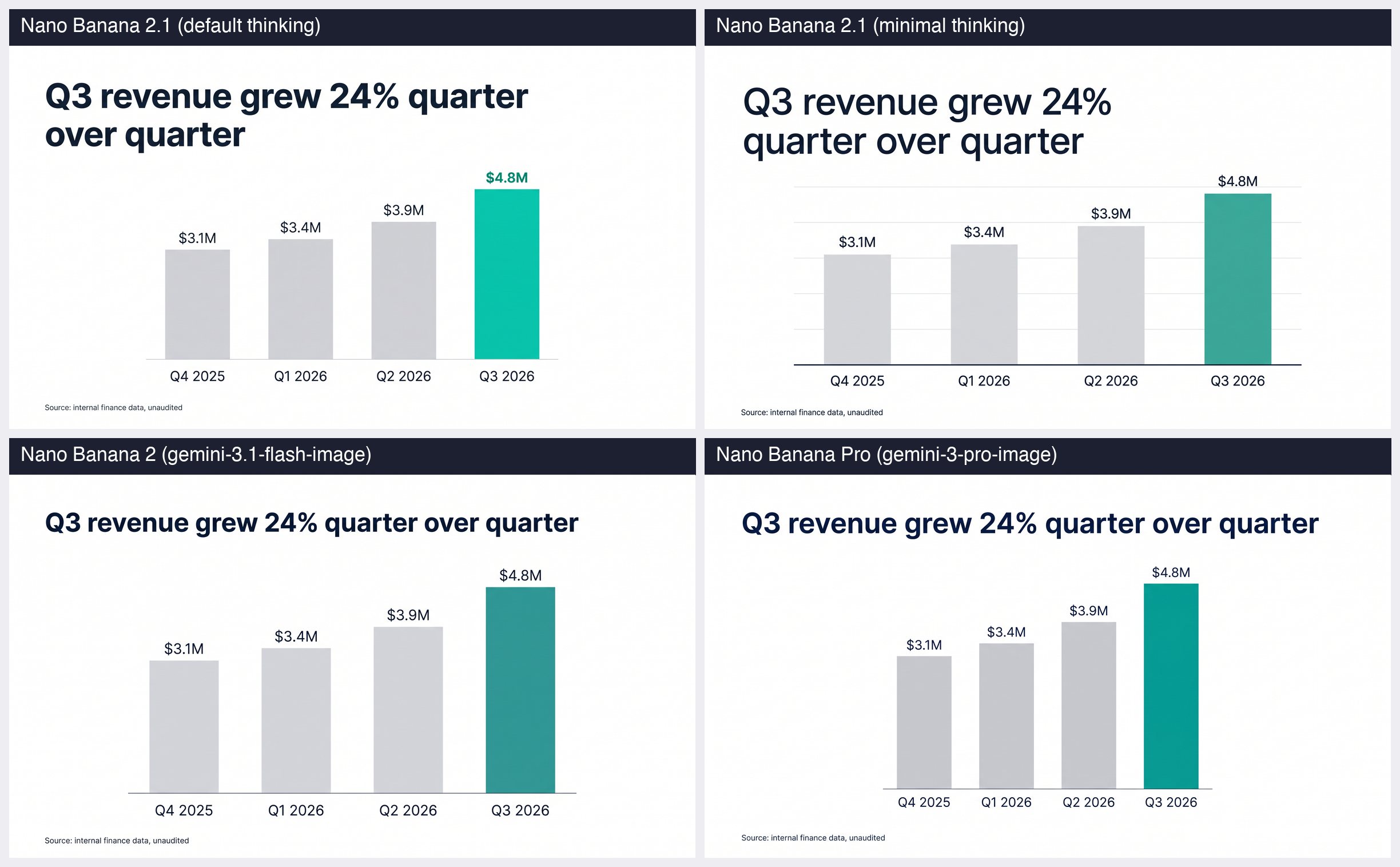
All four chart slides had the right values on the right bars, and bar heights matched the numbers. The differences were in layout: Nano Banana 2.1 wrapped the title onto two lines both times, and the minimal-thinking run added gridlines.
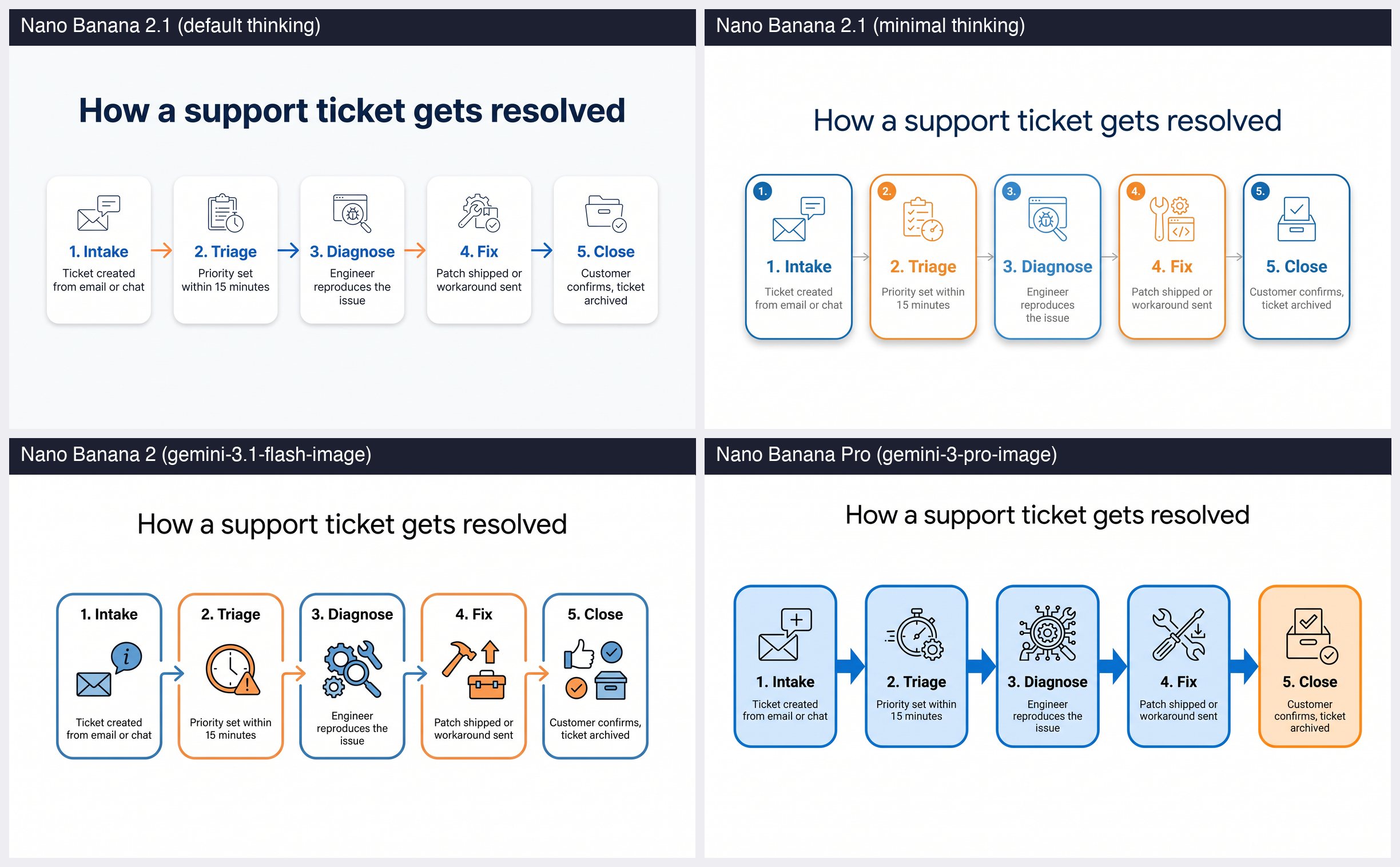
The process diagram is where Nano Banana 2.1 looked best to us. We asked for one simple line icon per step. Nano Banana 2.1 followed that; Nano Banana 2 drew two or three filled icons in each box.
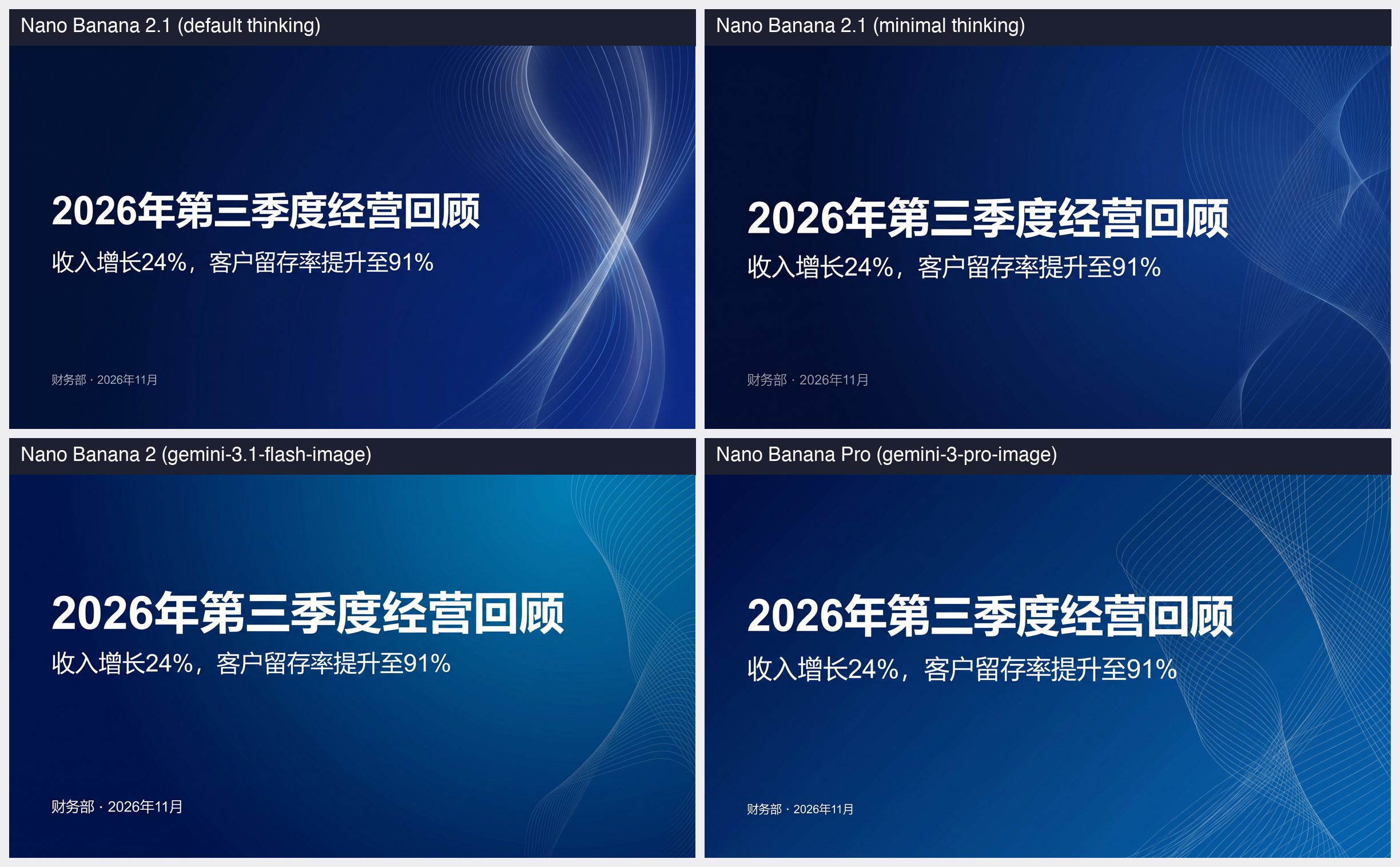
All four settings rendered the Chinese title, subtitle and footer without a wrong character.
Nano Banana 2.1 took a median of 59 seconds per 2K slide at default settings and 37 seconds with minimal thinking. Nano Banana 2 took 23 seconds and Nano Banana Pro 54 seconds.
| Seconds per 2K image | Median | Fastest | Slowest |
|---|---|---|---|
| Nano Banana 2.1, default thinking | 58.7 | 37.5 | 73.0 |
| Nano Banana 2.1, minimal thinking | 36.8 | 35.2 | 46.4 |
| Nano Banana 2 | 23.0 | 21.7 | 28.1 |
| Nano Banana Pro | 54.1 | 38.2 | 235.7 |
These are wall-clock times for single requests from one project on one evening, so treat them as a snapshot. Two things stood out anyway. Nano Banana 2.1 was about 2.5 times slower than Nano Banana 2 at default settings, which is the opposite of what "Flash-level speed" suggests. And one Nano Banana Pro request took almost four minutes, while one of our Nano Banana 2.1 requests was rejected with a 429 "resource exhausted" error and succeeded when we retried it eleven minutes later.
If you generate a 10-slide deck one image at a time, that is roughly ten minutes on Nano Banana 2.1 at default settings, six minutes with minimal thinking and four minutes on Nano Banana 2. Running requests in parallel shortens this, within your rate limit.
Google's model card puts Nano Banana 2.1 ahead of Nano Banana Pro on infographic design and on infographic factuality. These are Google's own human-preference ratings, published in October 2026, not ours.
| Google's published score | Nano Banana 2.1 (thinking) | Nano Banana 2.1 (no thinking) | Nano Banana 2 | Nano Banana Pro |
|---|---|---|---|---|
| Overall preference (Elo) | 1050 | 1015 | 990 | 935 |
| Infographic design (Elo) | 1048 | 1001 | 961 | 912 |
| Infographic factuality (0 to 1) | 0.521 | 0.328 | 0.179 | 0.265 |
Source: Nano Banana 2.1 model card, Google DeepMind, published October 6, 2026.
Our small test agrees on design: the Nano Banana 2.1 slides were at least as clean as the Pro slides. It does not show the gap on text that the scores imply. Pro made no text errors in five slides and Nano Banana 2.1 made one. Note also that Google's factuality score drops from 0.521 to 0.328 when thinking is off. Minimal thinking was faster and cheaper in our test and did fine on slides where we supplied every word, but we would keep thinking on when the model has to supply facts itself.
Use Nano Banana 2.1 for drafts, volume and slides where you supply the exact text. Use Nano Banana Pro for the final version of text-heavy slides you cannot proofread one by one.
| Your situation | Pick | Why |
|---|---|---|
| Drafting or iterating on a deck | Nano Banana 2.1, minimal thinking | $0.05 per slide, 37 seconds, exact text in 5 of 5 test slides |
| Slides where the model fills in facts or data | Nano Banana 2.1, default or high thinking | Google's factuality score is much higher with thinking on |
| Final slides with small text, footers, dense tables | Nano Banana Pro | 5 of 5 exact in our test, including the small footer |
| Thousands of images overnight | Nano Banana 2.1 through the Batch API | $0.0252 per 2K image |
You still call gemini-3.1-flash-image | Plan the move to 2.1 | Deprecated; 2.1 is half the price, but slower in our test |
| You need 512px thumbnails | Stay on Nano Banana 2 for now, or use 1K | 2.1 does not offer 512px |
Whichever model you choose, an image model gives you a picture of a slide. You cannot click into the title and fix a typo; you regenerate the image. That is the trade-off behind every row above, and it is why a footer typo costs more than it looks.
On the Gemini API, set the model to gemini-nano-banana-2.1 and ask for a 16:9 image at 2K:
curl -s -X POST \
  "https://generativelanguage.googleapis.com/v1beta/models/gemini-nano-banana-2.1:generateContent" \
  -H "x-goog-api-key: $GEMINI_API_KEY" \
  -H "Content-Type: application/json" \
  -d '{
    "contents": [{"role": "user", "parts": [{"text": "Create one 16:9 presentation slide. Title, exactly: \"Plan comparison\". ..."}]}],
    "generationConfig": {
      "responseModalities": ["TEXT", "IMAGE"],
      "imageConfig": {"aspectRatio": "16:9", "imageSize": "2K"},
      "thinkingConfig": {"thinkingLevel": "minimal"}
    }
  }'
Our test used the same request body on Google Cloud, with the location written into the URL: https://aiplatform.googleapis.com/v1/projects/YOUR_PROJECT/locations/global/publishers/google/models/gemini-nano-banana-2.1:generateContent. Leave out thinkingConfig to get the default (medium). Google's guide also documents the newer Interactions API for the same model; see the image generation guide.
Three prompt habits helped in every run:
For ready-made slide prompts, see our Nano Banana presentation slides page, which collects community design-style prompts.
2Slides does not offer Nano Banana 2.1 yet. As of November 12, 2026, image-based slide generation in 2Slides runs on Nano Banana Pro by default, in the workspace and through the 2Slides API. We ran this test partly to decide whether to add 2.1 as the lower-cost option, and the numbers above are the ones we are using for that decision.
If you need slides you can edit afterwards, an image model is the wrong tool on its own, whichever version you pick. 2Slides' template-based Fast PPT flow generates editable PowerPoint files from a prompt instead; the difference between the two approaches is covered in 2Slides vs the Gemini Nano Banana API.
Nano Banana 2.1 became generally available in the Gemini API on October 6, 2026, according to Google's Gemini API release notes. The model ID is gemini-nano-banana-2.1.
At Google's list price on November 12, 2026, Nano Banana 2.1 costs $0.0336 per 1K image, $0.0504 per 2K image and $0.113 per 4K image, with the Batch API at half those prices. In our test, thinking tokens raised the 2K cost to about $0.063 per image at default settings.
It depends on the job. Google's model card scores Nano Banana 2.1 above Pro on overall preference and infographic design, and it costs less than half as much. In our five-slide test Pro rendered every slide's text exactly, while Nano Banana 2.1 at default settings made one typo in a small footer. For final, text-heavy slides we would still use Pro.
Nano Banana 2.1 is the successor to Nano Banana 2 (gemini-3.1-flash-image), which is now deprecated. Version 2.1 costs half as much per image, has configurable thinking levels and drops the 512px size. In our test it fixed a duplicated-bullet error that Nano Banana 2 made, and it took about 2.5 times as long per image at default settings.
Not through the API: Google's pricing page lists the free tier as not available for Nano Banana 2.1. Google's model card lists the Gemini app and Google AI Studio among the places the model is distributed; check those products for their current free limits.
Yes for drafts and for slides where you provide the exact wording: charts, tables, process diagrams and title slides all came out usable in our test, including a slide in Simplified Chinese. Proofread small text such as footers and source lines, and remember that the output is an image, so a correction means generating the slide again.
No. Nano Banana Pro (gemini-3-pro-image) is still generally available with no shutdown date, and Google describes Nano Banana 2.1 as its more efficient counterpart. The model that 2.1 replaces is Nano Banana 2.
Create stunning AI-powered presentations in seconds. Transform your ideas into professional slides with 2slides AI Agent.
Try For FreeYour AI Agent for slides. Save time, shine faster with intelligent presentation creation.


© 2026 2slides. All rights reserved.