
2Slides Team
17 min read

Patient education slides automation means a backend job reads approved, de-identified source text (discharge instructions, procedure explainers, clinical guidelines) from your content repository and turns it into decks through the 2Slides API. Fast PPT generate produces an editable PPTX per condition and per language at 10 credits per page, so an 8-page deck is 80 credits, about $0.20. create-pdf-slides plus generate-narration produces narrated staff training decks. It is built for hospital education teams, digital health companies, and medcomms agencies.
Key takeaways
responseLanguage value; 2Slides outputs 20+ languages including Spanish, Vietnamese, and Arabic.userInput: no patient names, MRNs, or dates of birth. Every jobId, source version, and reviewer decision is written to an audit table.You run patient education at a hospital system, own content at a digital health company, or produce materials at a medcomms agency. The pain is the same: a guideline changes, and 40 condition-specific decks in 6 languages are suddenly stale while the people who could fix them are running clinics. A backend job that regenerates decks from the approved source and routes them to a clinical reviewer removes the manual rebuild without removing the review.
Do not use this recipe if your source text is not yet approved, or if anything patient-specific would need to enter a prompt. It publishes controlled content at scale; it does not generate individualized care plans.
| Step | Tool | What happens | 2Slides endpoint / credits |
|---|---|---|---|
| 1 | Secrets manager, backend service | Store the API key server-side, define what text may enter a prompt | GET /api/v1/echo (free auth check) |
| 2 | Content repository (Git, CMS, DAM) | Approved, de-identified source text with a version stamp and checksum | none |
| 3 | Backend job | Pick a calm clinical template, generate one deck per condition per language | GET /api/v1/themes/search (free), POST /api/v1/slides/generate (10 credits/page) |
| 4 | Job runner + review database | Poll, download PPTX, store with jobId and source version, mark pending review | GET /api/v1/jobs/{id} (free) |
| 5 | Same job, training track | Image-designed staff in-service deck, then narration for onboarding videos | create-pdf-slides (10 + 100/page at 2K), generate-narration (210/page) |
| 6 | Clinical reviewer, publisher | Approve or reject, stamp version, publish to portal or LMS | download-slides-pages-voices (free ZIP of PNG + WAV) |
Before any code, write down the boundary: what text may leave your network as userInput. For patient education, that is approved, general-audience content describing a condition, a procedure, or an instruction. It never describes a specific patient. The HIPAA Privacy Rule, documented at hhs.gov/hipaa, governs protected health information; your privacy officer decides how a third-party generation service fits your policies. Nothing in this article replaces that review.
Then get an API key at 2slides.com/api. Keys are issued in the API Keys tab with 500 free credits, enough for about six 8-page test decks. The key lives in a secrets manager or a server-side environment variable, never in a browser, a mobile app, or a shared notebook.
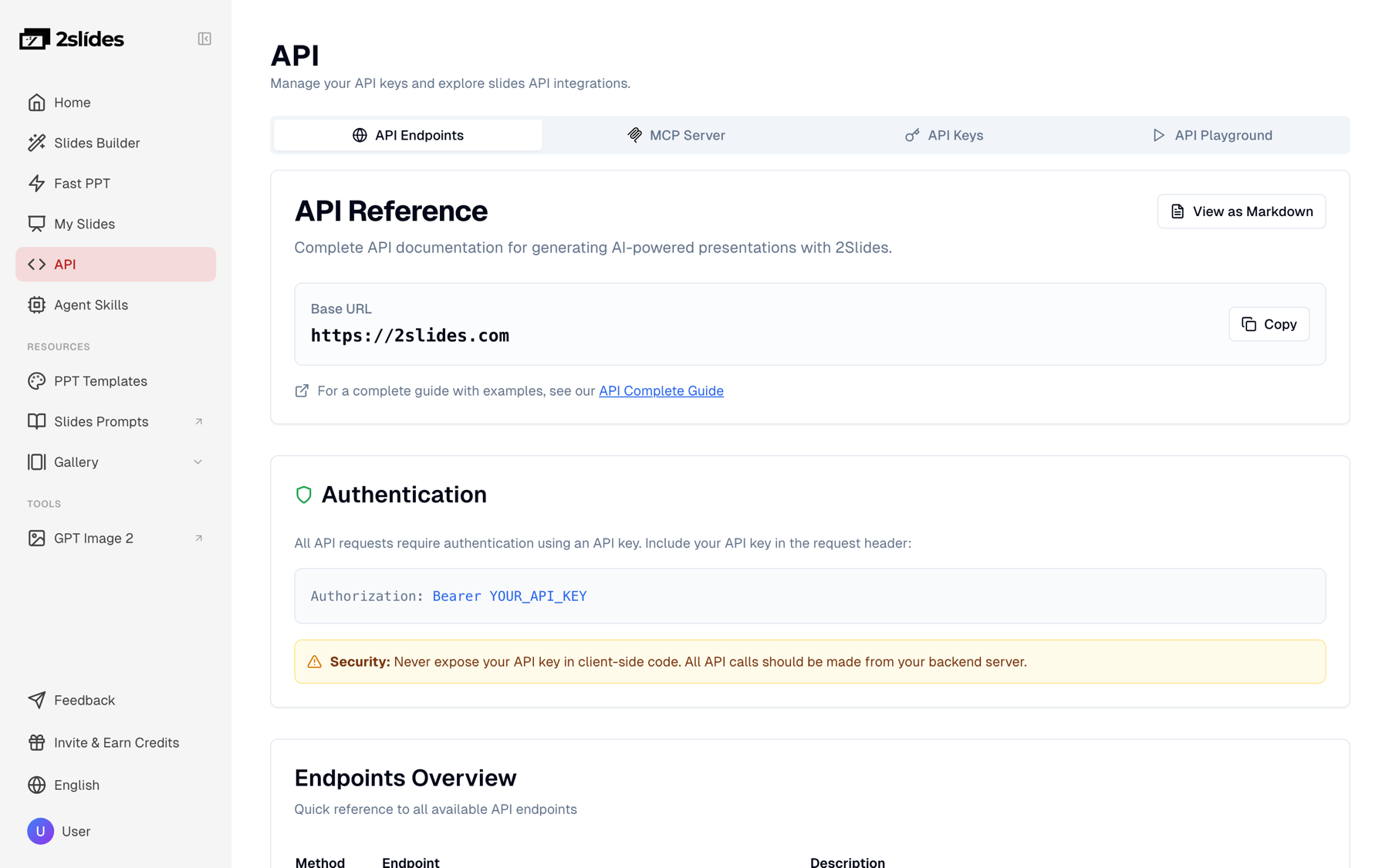
Figure 1: The API reference page on 2slides.com, including the security note that keys must stay server-side.
Verify the key from the server that will run the job:
curl -s https://2slides.com/api/v1/echo \
  -H "Authorization: Bearer $SLIDES_API_KEY"
An authenticated response means the credential is in place and you can move on to the content.
The generation job reads from a record, not from a chat window. A minimal source record carries the approved text, a version, and the approving body, so any deck can be traced back to the exact words it was built from.
{
  "slug": "heart-failure-discharge",
  "title": "Going home after a heart failure admission",
  "version": "2026.09.1",
  "approved_by": "Clinical Education Committee",
  "approved_on": "2026-09-03",
  "reading_level": "Grade 6",
  "approved_text": "Heart failure means the heart is not pumping as well as it should. After you go home: weigh yourself every morning... Call your care team if you gain 3 pounds in one day or 5 pounds in one week..."
}
Three rules keep this record safe to send:
approved_text field of a record whose status is approved. Drafts are ignored.Pick the template once. Search for a calm, clinical look and store the returned themeId as configuration:
curl -s "https://2slides.com/api/v1/themes/search?query=healthcare&limit=5" \
  -H "Authorization: Bearer $SLIDES_API_KEY"
Also try query=medical. Choose high contrast, large type, and no dense infographics; patient decks are read on phones in waiting rooms and printed at the nurses' station.
Then generate one deck per language. The English source stays the same; only responseLanguage changes. Use mode: "async" because you are submitting several jobs in a batch.
curl -s -X POST https://2slides.com/api/v1/slides/generate \
  -H "Authorization: Bearer $SLIDES_API_KEY" \
  -H "Content-Type: application/json" \
  -d '{
    "userInput": "Going home after a heart failure admission. Heart failure means the heart is not pumping as well as it should. After you go home: weigh yourself every morning before breakfast. Take your medicines exactly as listed on your medicine sheet. Limit salt to the amount your care team told you. Call your care team if you gain 3 pounds in one day or 5 pounds in one week, if you are more short of breath, or if your legs swell. Source version 2026.09.1, reviewed by the Clinical Education Committee.",
    "themeId": "<themeId from themes/search>",
    "responseLanguage": "Spanish",
    "mode": "async"
  }'
The response is { "jobId": "..." }. Repeat with "Vietnamese", "Arabic", "Simplified Chinese", and any other language on the supported list. Pass the language name, not a code; "es" will not work, "Spanish" will.
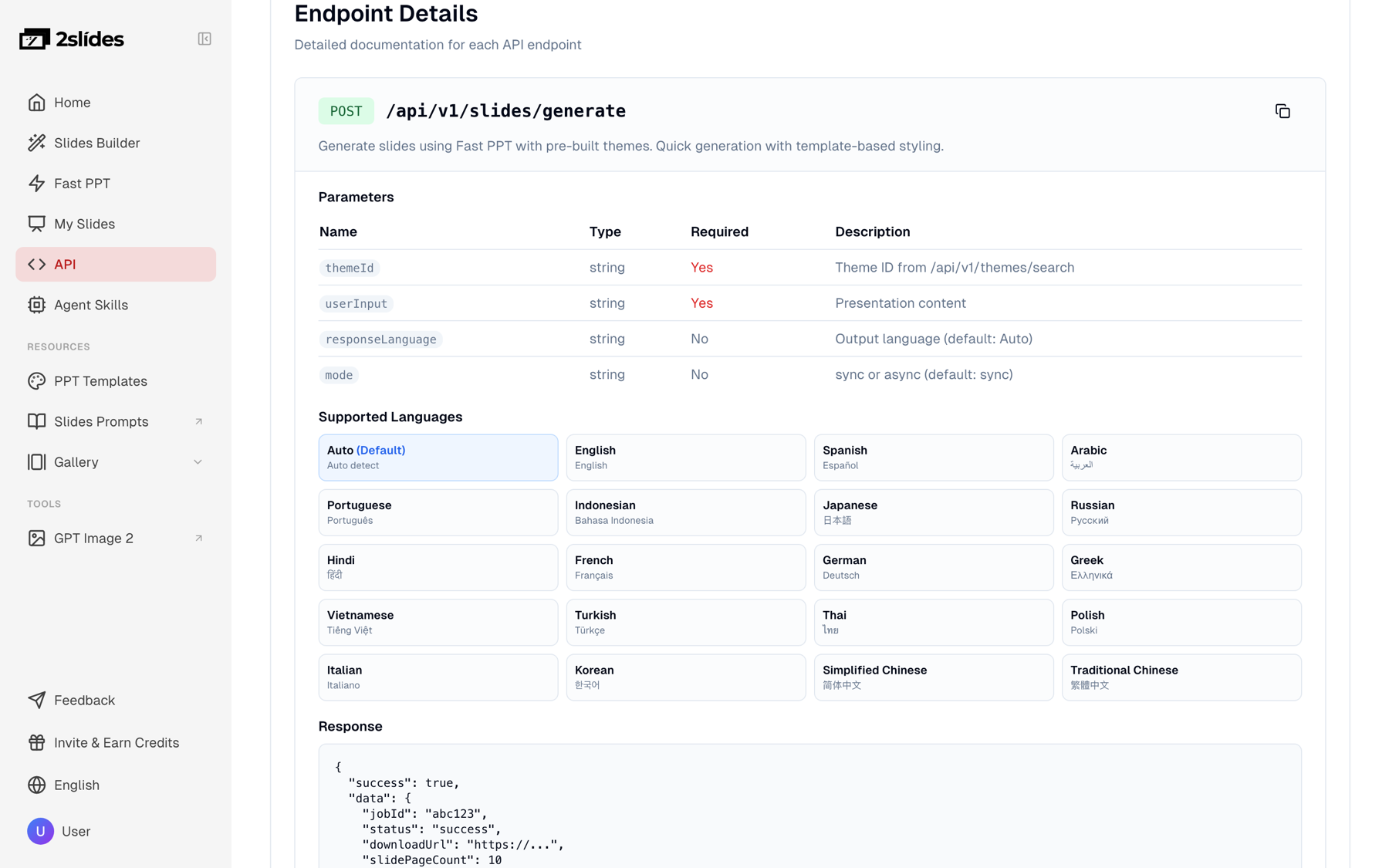
Figure 2: The generate endpoint documentation showing responseLanguage and the 20+ supported output languages.
Poll every 5 to 10 seconds until the job is success or failed:
curl -s https://2slides.com/api/v1/jobs/<jobId> \
  -H "Authorization: Bearer $SLIDES_API_KEY"
A finished job returns a downloadUrl for the PPTX. The rate limit is 6 requests per minute per key on generate and 10 per minute on jobs/{id}. Ten languages for one condition means ten submissions spaced 10 seconds apart, and each deck comes back in roughly 30 seconds.
The job below reads one approved source record, generates a deck per language, downloads each PPTX, and writes a row to a deck_reviews table with status pending_review. Nothing is published from this script. A reviewer, a bilingual clinician or certified medical translator for non-English versions, calls approve() after checking the file.
import hashlib
import json
import os
import sqlite3
import time

import requests

API = "https://2slides.com/api/v1"
HEADERS = {
    "Authorization": f"Bearer {os.environ['SLIDES_API_KEY']}",
    "Content-Type": "application/json",
}
# Chosen once from GET /api/v1/themes/search?query=healthcare, stored as config
THEME_ID = os.environ["CLINICAL_THEME_ID"]
LANGUAGES = ["English", "Spanish", "Vietnamese", "Arabic"]

db = sqlite3.connect("patient_education.db")
db.execute("""
CREATE TABLE IF NOT EXISTS deck_reviews (
  job_id         TEXT PRIMARY KEY,
  condition_slug TEXT,
  language       TEXT,
  source_version TEXT,
  source_sha256  TEXT,
  theme_id       TEXT,
  file_path      TEXT,
  status         TEXT,
  reviewer       TEXT,
  reviewed_at    TEXT,
  created_at     TEXT
)""")


def now():
    return time.strftime("%Y-%m-%dT%H:%M:%SZ", time.gmtime())


def assert_no_phi(text):
    # Minimal guard; extend with your own patterns and a human check upstream.
    import re
    if re.search(r"\bMRN\b|\b\d{7,10}\b|\b\d{1,2}/\d{1,2}/\d{2,4}\b", text):
        raise ValueError("Source text failed the PHI pattern check")


def submit(source, language):
    body = {
        "userInput": source["approved_text"],
        "themeId": THEME_ID,
        "responseLanguage": language,
        "mode": "async",
    }
    r = requests.post(f"{API}/slides/generate", headers=HEADERS, json=body, timeout=60)
    r.raise_for_status()
    return r.json()["jobId"]


def wait(job_id):
    while True:
        r = requests.get(f"{API}/jobs/{job_id}", headers=HEADERS, timeout=30)
        r.raise_for_status()
        job = r.json()
        if job["status"] == "success":
            return job["downloadUrl"]
        if job["status"] == "failed":
            raise RuntimeError(f"job {job_id} failed")
        time.sleep(8)  # poll every 5 to 10 seconds


def download(url, path):
    os.makedirs(os.path.dirname(path), exist_ok=True)
    with requests.get(url, stream=True, timeout=120) as r:
        r.raise_for_status()
        with open(path, "wb") as f:
            for chunk in r.iter_content(65536):
                f.write(chunk)


def enqueue_for_review(source):
    if source.get("status") != "approved":
        raise ValueError("Only approved source records may be generated")
    assert_no_phi(source["approved_text"])
    digest = hashlib.sha256(source["approved_text"].encode("utf-8")).hexdigest()

    for language in LANGUAGES:
        job_id = submit(source, language)
        url = wait(job_id)
        path = f"decks/{source['slug']}/{source['version']}/{language}_{job_id}.pptx"
        download(url, path)
        db.execute(
            "INSERT INTO deck_reviews VALUES (?,?,?,?,?,?,?,?,?,?,?)",
            (job_id, source["slug"], language, source["version"], digest,
             THEME_ID, path, "pending_review", None, None, now()),
        )
        db.commit()
        time.sleep(10)  # stay under 6 requests/min per key


def approve(job_id, reviewer):
    db.execute(
        "UPDATE deck_reviews SET status='approved', reviewer=?, reviewed_at=? WHERE job_id=?",
        (reviewer, now(), job_id),
    )
    db.commit()


def reject(job_id, reviewer):
    db.execute(
        "UPDATE deck_reviews SET status='rejected', reviewer=?, reviewed_at=? WHERE job_id=?",
        (reviewer, now(), job_id),
    )
    db.commit()


if __name__ == "__main__":
    with open("sources/heart-failure-discharge.json", encoding="utf-8") as f:
        enqueue_for_review(json.load(f))
Two design choices matter. The file path and the database row both carry the source version and the jobId, so a reviewer can always answer "which words produced this slide?" And the script has no publish step: publishing reads only rows where status = 'approved'.
Patient decks stay on the Fast PPT path because nurses and educators edit them in PowerPoint. Staff in-service training usually needs a video a new hire can watch during onboarding, which means image-designed slides plus voice: the create-pdf-slides to generate-narration chain, with the same key and the same compliance boundary.
Submit the approved protocol text. page: 0 lets the planner choose the slide count; resolution: "2K" keeps the cost at 100 credits per page.
curl -s -X POST https://2slides.com/api/v1/slides/create-pdf-slides \
  -H "Authorization: Bearer $SLIDES_API_KEY" \
  -H "Content-Type: application/json" \
  -d '{
    "userInput": "In-service: hand hygiene and PPE donning and doffing sequence for inpatient units. Approved protocol version 2026.09. <approved protocol text here>",
    "designStyle": "Calm clinical training deck, soft blue and white, large readable type, simple line icons, no photographs of patients",
    "aspectRatio": "16:9",
    "resolution": "2K",
    "page": 0,
    "contentDetail": "standard",
    "responseLanguage": "English"
  }'
Poll jobs/{jobId} as before. When the deck is success, request narration for that job:
curl -s -X POST https://2slides.com/api/v1/slides/generate-narration \
  -H "Authorization: Bearer $SLIDES_API_KEY" \
  -H "Content-Type: application/json" \
  -d '{
    "jobId": "<jobId from create-pdf-slides>",
    "mode": "single",
    "speakerName": "Clinical Educator",
    "voice": "Kore",
    "contentMode": "standard",
    "includeIntro": true
  }'
Narration is async only and costs 210 credits per page. When it finishes, POST /api/v1/slides/download-slides-pages-voices with { "jobId": "..." } returns a free ZIP of per-page PNG and WAV files that your pipeline stitches into an MP4 with FFmpeg or hands to your LMS. Narration scripts go through the same reviewer as the slides; a wrong dose in audio is still a wrong dose. For structuring the content itself, see how to make a training deck with AI; if the protocol lives as a PDF, the PDF to slides workflow covers summarizing it before submission.
Publishing is a database query, not a generation call. The publisher picks rows with status = 'approved', copies the PPTX (or an exported PDF) to the patient portal, kiosk, or LMS, and prints the version stamp on the published page: source version, approval date, language. When the source record changes to 2026.10.1, the job regenerates every language, old rows are marked superseded, and the reviewer queue fills again.
The deck_reviews table is your audit log. Per deck it answers what a quality team will ask: which source version, which checksum, which template, which jobId, who reviewed it, and when. Retain it as long as your records policy requires.
If no Fast PPT template matches your visual identity, the image-designed path can derive a design system from a reference. The 2Slides Gallery hosts real-world reference decks you can pass as referenceImageUrl to create-like-this, or use as inspiration for a designStyle prompt. They are reference decks, not API outputs from this workflow.

Figure 3: Title slide of "The Future of Wellness 2025 Edition" from the 2Slides Gallery, a soft, low-contrast health-sector style suitable as a referenceImageUrl.
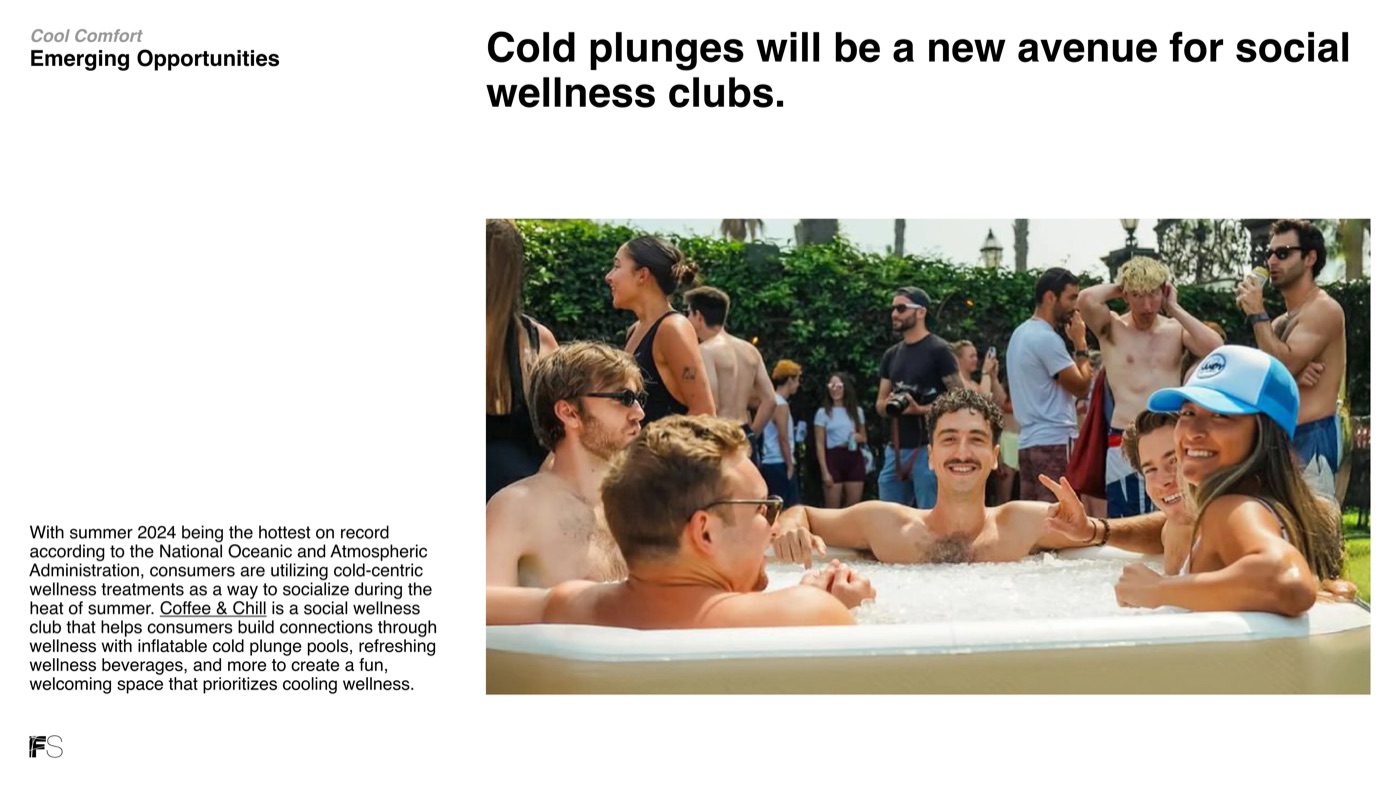
Figure 4: A content slide from the same Gallery deck, showing how a restrained palette keeps clinical information readable.
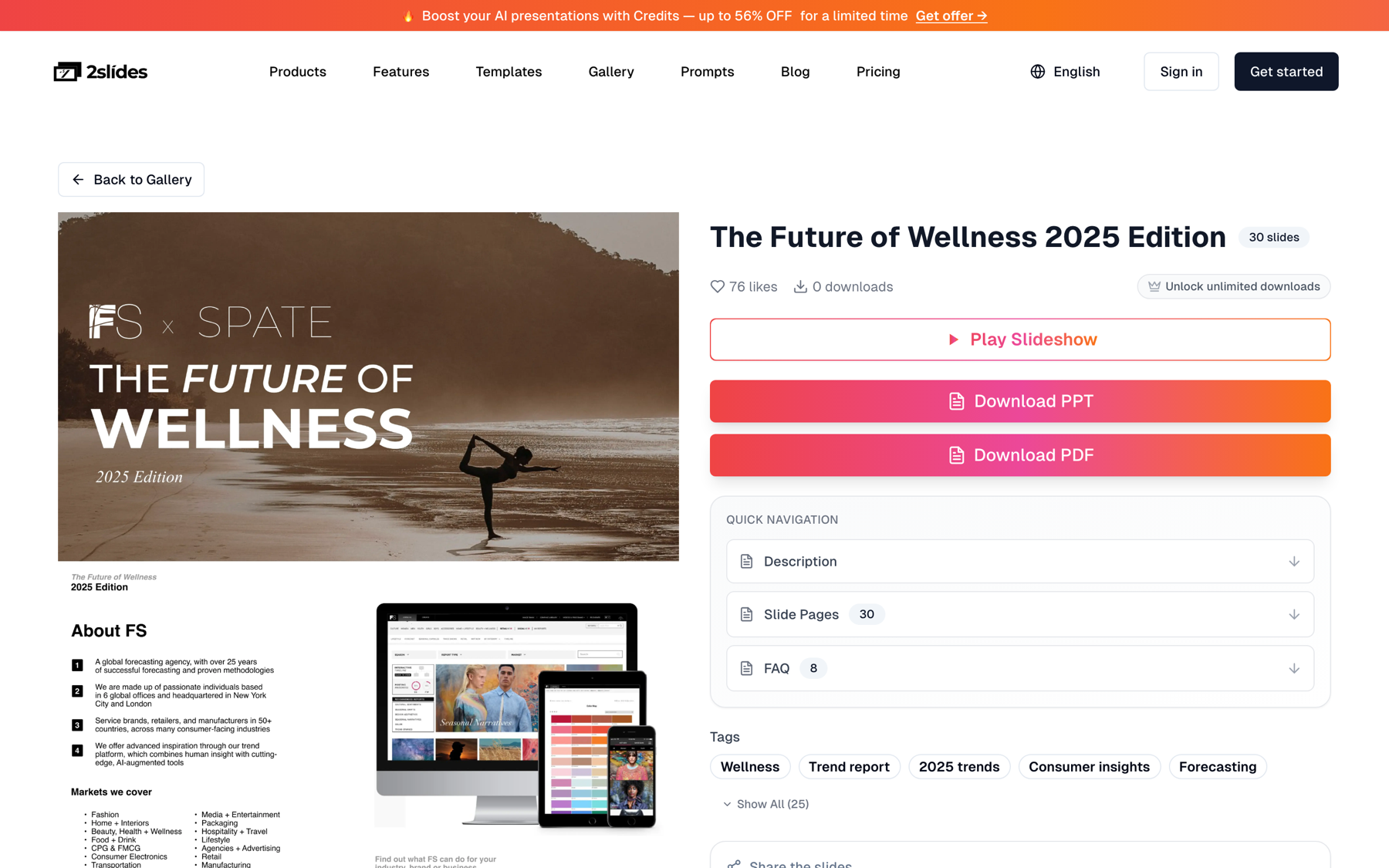
Figure 5: The Gallery detail page, with slide-by-slide preview and PPT/PDF download; copy a slide image URL here to use as a reference.
For most hospital teams the better reference is your own approved brand slide: host it at a public URL, pass it as referenceImageUrl, and every staff deck inherits that design system.
Two realistic monthly volumes. Patient decks are 8-page Fast PPT files; staff training decks are 10-page 2K image-designed decks with narration.
| Item | Credits each | Tier A: 20 patient decks + 2 narrated training decks | Tier B: 500 patient decks + 10 narrated training decks |
|---|---|---|---|
| Patient deck, 8 pages, Fast PPT | 80 | 1,600 | 40,000 |
| Staff deck, 10 pages, 2K images | 1,010 | 2,020 | 10,100 |
| Narration, 10 pages | 2,100 | 4,200 | 21,000 |
| Total credits | 7,820 | 71,100 | |
| Approximate USD | $19.55 at $0.0025/credit (fits the $22.50 pack of 10,000) | $142.20 at $0.002/credit ($80 packs of 40,000) |
Tier A is a 10-condition library in 2 languages plus two in-service videos a month. Tier B is a 50-condition library in 10 languages plus ten videos, roughly a multi-site system. Credits are pay-as-you-go; the optional Pro plan adds 10,000 credits per month but is not required for API access.
| Need | Use | Why |
|---|---|---|
| Patient handouts nurses will edit and print | generate (Fast PPT) | Native editable PPTX, 10 credits/page, about 30 seconds per deck |
| Same content in 10 languages | generate with responseLanguage | One source, one parameter change per language |
| Onboarding video for staff | create-pdf-slides then generate-narration | Only image-designed jobs can be narrated; ZIP of PNG + WAV builds the MP4 |
| Decks that must match a hospital brand image | create-like-this with referenceImageUrl | Derives the design system from your approved slide |
Fast PPT cannot be narrated. A patient-facing deck that needs audio for low-literacy audiences goes on the image-designed path at 100 credits per page plus 210 per page for narration, and comes back as PDF plus images rather than editable PPTX.
userInput, and keep a human de-identification step upstream.generate, create-pdf-slides, and generate-narration allow 6 requests per minute per key. Queue submissions 10 seconds apart; a 50-condition by 10-language rebuild is 500 jobs and about 84 minutes of submissions, fine for a nightly job.generate-narration rejects jobIds from generate. Use create-pdf-slides or create-like-this for anything that needs voice.responseLanguage takes a name such as "Vietnamese" or "Traditional Chinese". Codes like "vi" fail.page: 0 on the image-designed path and let the planner choose the count.It is appropriate when the content is approved, general-audience, and contains no protected health information. Discharge instructions for "patients with heart failure" carry no PHI; a note about a named patient does. Keep the PHI check automated and upstream and involve your privacy officer. 2Slides does not claim HIPAA certification, and this article is not legal advice.
2Slides supports 20+ output languages through responseLanguage, including English, Spanish, Arabic, Portuguese, Vietnamese, Simplified Chinese, Traditional Chinese, Hindi, Korean, Russian, French, and German. Pass the language name, not an ISO code. Treat the output as a first draft for a bilingual clinician or certified medical translator to review before publishing.
Yes, but only on the image-designed path. Generate the patient deck with create-pdf-slides (100 credits per page at 2K) instead of Fast PPT, then call generate-narration at 210 credits per page. A 6-page narrated patient explainer costs 10 + 600 + 1,260 = 1,870 credits, about $4.68. Fast PPT jobs cannot be narrated.
Bump the source record version, mark the old rows superseded, and rerun the job. Each language gets a new jobId, a file path containing the new version, and a new pending_review row. The published stamp changes only when a reviewer approves, so patients never see an unreviewed update, and the audit log shows when each language switched.
Gamma's API, documented at developers.gamma.app, offers similar generation automation but requires a Pro plan to issue API keys, while 2Slides keys work on any account, including the free tier with 500 credits. That makes a hospital IT pilot possible before any purchase. Both are third-party services, so the same de-identification rules apply to either, and this comparison is written by the 2Slides team.
Patient education slides automation is mostly a governance exercise with a small amount of code: an approved source record, a job that generates one deck per language, and a review queue that gates publishing.
Create stunning AI-powered presentations in seconds. Transform your ideas into professional slides with 2slides AI Agent.
Try For FreeYour AI Agent for slides. Save time, shine faster with intelligent presentation creation.




© 2026 2slides. All rights reserved.