
2Slides Team
18 min read

An AI presentation maker for startups turns your memo, business plan, or metrics sheet into a structured 10–12 slide pitch deck in a few minutes. The deck you need depends on your stage and how investors will see it: a sent-ahead deck that has to stand on its own, a presented deck that backs up your voice, or a 3-minute demo-day deck. AI saves you the layout and formatting work. It can't fix weak traction or invent a story you don't have, and investors have learned to recognize generic AI decks. Use it for the first draft, then put your hours into the numbers and the narrative.
Key takeaways
Most founders build one deck and use it everywhere, and it works badly everywhere. Y Combinator's design guidance, Kevin Hale's "How to design a better pitch deck", sums up a presented deck in three words: legible, simple, obvious. Big text, one idea per slide, and nothing the audience has to work out while you're talking. A sent-ahead deck has the opposite job. Nobody is in the room to explain it, so the slides have to carry the full argument.
AI helps here because it makes extra versions cheap. Once your content is structured, rebuilding it as a sparse 6-slide demo deck or a denser 14-slide sent deck takes minutes, not a weekend.
| Deck type | Who sees it, and how | Slide count | Density | Format that works |
|---|---|---|---|---|
| Accelerator application deck | Reviewers skimming dozens of applications | 8–12 | Medium; must stand alone | PDF link |
| Sent-ahead deck | Investor reads it alone, often on a phone | 12–15 | High; full sentences OK | PDF, or narrated MP4 |
| Presented deck | Partner meeting, you talking | 10–12 | Low; headline plus one visual | PPTX / screen share |
| Demo-day deck | Large room, 2–3 minutes | 5–7 | Very low; one number per slide | 16:9, huge type |
| Data room teaser | Interested investor after the first call | 3–5 | High; metrics-first | |
| Investor update | Existing investors, monthly or quarterly | 5–8 | Medium | PDF or MP4 |
Sequoia's "Writing a business plan" is still the most cited outline: company purpose, problem, solution, why now, market potential, competition, business model, team, financials, and vision. YC's seed deck guidance puts more weight on traction and a clear ask, and it reminds seed founders that a strong narrative beats detail they don't have yet. Put them together and you get this:
| # | Slide | What it has to prove | What AI can draft | What only you can supply |
|---|---|---|---|---|
| 1 | Title + one-liner | What you do, in one sentence | Layout, tagline options | The one-liner that actually works |
| 2 | Problem | A painful, specific, frequent problem | Framing, structure | Customer quotes, evidence |
| 3 | Solution | How you solve it, simply | Clean product summary | Screenshots, demo GIF |
| 4 | Why now | What changed in the world | Trend framing | Your specific insight |
| 5 | Market | A large market, sized bottom-up | TAM/SAM/SOM visual | The real calculation |
| 6 | Traction | It's working | Chart layout | Every number |
| 7 | Business model | How you make money | Pricing table | Real unit economics |
| 8 | Competition | Why you win | 2x2 or feature grid | Honest positioning |
| 9 | Go-to-market | How you'll get customers | Funnel structure | Channels you've tested |
| 10 | Team | Why you are the people to do this | Grid, bios | Earned secrets, history |
| 11 | Financials / use of funds | Where the money goes | Allocation chart | The plan and the runway |
| 12 | The ask | Round size and milestones | Slide layout | Terms, amount committed |
If you want ready-made prompts for each of these slides, 25 pitch deck prompts for AI slide tools has them organized by slide.
At pre-seed you're selling the team, the insight, and early signs that customers care. Investors know you don't have much revenue. A thin traction slide is fine. A padded one isn't. Swap "Financials" for "Milestones this round buys": the three or four things that will be true in 18 months that make you fundable at Series A. Ten slides is plenty.
Good source material: a one-page memo, your YC or accelerator application answers, a few customer interview notes, and a waitlist or pilot count.
At Series A the deck turns into a metrics document. Partners expect a monthly revenue chart, retention or cohort data, CAC and payback, gross margin, and a credible plan to get to the next step. The sent version often runs 15–20 slides with an appendix. Here AI earns its keep on charts and formatting, and you have to check every figure against your financial model. If you're also making board materials, how to create a board deck with AI uses the same metric slides.
Good source material: your financial model export (XLSX/CSV), board decks, and the KPI sheet you already send to investors.
Demo-day slots are short. Two to three minutes is typical, and some programs give you less. That means 5–7 slides: one-liner, problem, traction (one big number), why you win, team, ask. Every slide should be readable from the back of a hotel ballroom. Ask your AI tool for "one number or one sentence per slide, no bullets," then rehearse until the slides just sit behind you while you talk.
After a good first call, investors usually ask for "a bit more." A 3–5 slide teaser covering cohort retention, pipeline, unit economics, and the hiring plan gets you to the data room without sending the whole model. After you close, the same discipline goes into monthly or quarterly updates. How to make an investor update presentation with AI covers that format.
2Slides has two generation flows. Pick based on whether you need to edit the deck by hand afterward.
| Fast PPT | Workspace flow | |
|---|---|---|
| Where | /fast-ppt and /templates | Create Slides from File, Create Slides Like This, AI pitch deck slides |
| Output | Real editable PPTX with native text boxes | Designed, image-based slides; PDF, per-page PNG, MP4 |
| Cost | 10 credits per page | About 10 planning credits + 100 per page (2K) or 200 (4K) |
| Narration / MP4 | No | Yes: per-page AI voiceover, 16:9 or 9:16 video |
| Best for | The presented deck you'll keep tweaking | Sent decks, demo-day visuals, async video walkthroughs |
One honest caveat: Workspace slides are images. They look polished, but you can't click in and change a typo or a number. If your traction figures will change next week, keep the working version in Fast PPT and regenerate the designed version once the numbers are final.
A deck generated from a one-line prompt reads like everyone else's. A deck generated from your own memo reads like you. Upload your one-page memo, business plan (DOCX or PDF), or metrics export to Create Slides from File. It accepts PDF, DOCX, XLSX/CSV, Markdown, and TXT. If the business plan is the real starting point, how to create a business plan presentation with AI goes deeper on that conversion.
A prompt that works well with an uploaded memo:
Turn this memo into a 12-slide seed pitch deck for a sent-ahead email.
Order: title + one-liner, problem, solution, why now, market (bottom-up),
traction, business model, competition, go-to-market, team, use of funds, ask.
Use ONLY numbers that appear in the memo. If a number is missing,
leave a visible placeholder like [ARR TBD] instead of estimating.
One headline sentence per slide that states the takeaway, not the topic.
That placeholder instruction matters. It stops the model from filling a gap with a believable fake number, which is the most damaging mistake an AI-generated deck can make. More on this in our AI presentation fact-checking guide.
For the deck you'll present and revise between meetings, use Fast PPT. Pick a clean template from the library, paste your structured content, and download a PPTX you can open in PowerPoint, Keynote, or Google Slides. When you move the ask from $1.5M to $2M, you edit one text box instead of regenerating the deck.
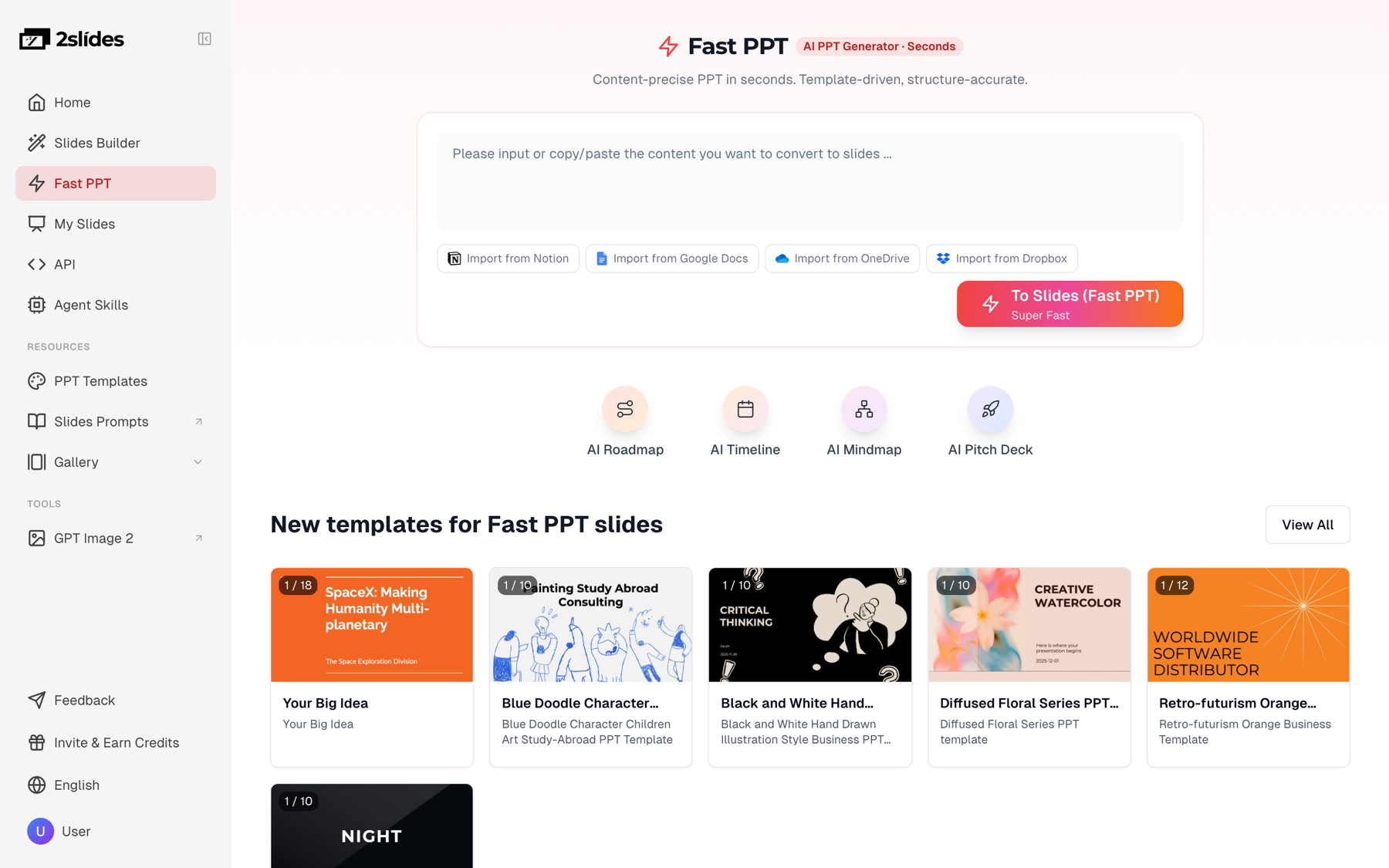
Figure 1: Fast PPT generates a real, editable PPTX at 10 credits per page.
Prompt for the presented version:
Presented version of this deck: 10 slides, maximum 12 words per slide
plus one visual or one number. No bullet lists. Speaker notes should
hold the detail I will say out loud.Most founders have a deck they admire, maybe a friend's Series A deck or a public one from a company they respect. Upload one slide as a style reference to Create Slides Like This, and 2Slides generates your content in that visual language: palette, type weight, layout rhythm. You borrow the look, not their content. This is also the quickest way to stay away from the default-template look that gives AI decks away. Can AI make slides that don't look AI-generated? covers the rest of the techniques.
For examples of real company decks to study, browse the 2Slides gallery. It hosts public presentations, including startup pitch decks and investor-day decks, page by page.
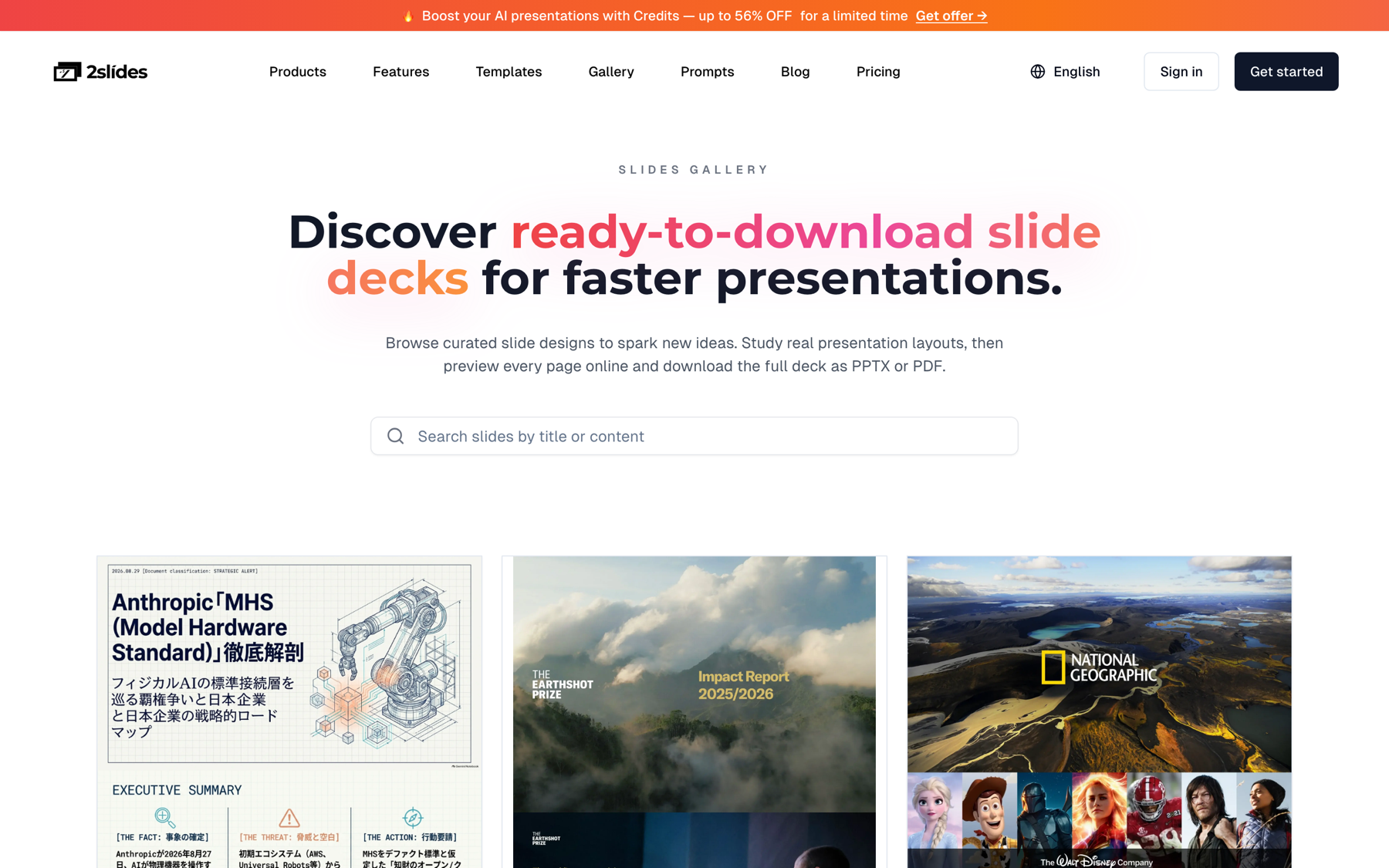
Figure 2: The gallery is a useful library of real decks to study for structure and style.
A lot of first looks now happen asynchronously. An investor opens your deck between meetings, and a 2-minute narrated walkthrough gets your voice and emphasis across in a way a PDF can't. In the Workspace flow, you add per-page AI narration (multiple voices available, including two-speaker dialogue) and export a 16:9 MP4. Keep it to 2–4 minutes and send it alongside the PDF, not instead of it. From file to narrated video walks through the mechanics.
Narration only works on Workspace decks, the ones made with Create Slides from File or Create Slides Like This. Fast PPT decks can't be narrated.
The founder: two-person team building inventory software for independent restaurants. $9K MRR across 31 paying locations, 14 months in, raising a $1.8M seed.
Source material:
What they generate:
| Deliverable | Flow | Pages | Credits |
|---|---|---|---|
| Presented deck (editable PPTX) | Fast PPT | 12 | 120 |
| Sent-ahead deck (designed, PDF) | Create Slides Like This, using memo + reference slide | 12 | ~1,210 |
| Narrated walkthrough MP4 | Narration on the sent deck | 12 | 2,520 |
| Total | ~3,850 |
New accounts start with 500 free credits. One 4,000-credit pack ($9.50) covers the rest with room to regenerate a few slides. If you plan to rebuild versions for several investor segments over a few weeks of fundraising, the Pro plan ($12.50/month for 10,000 credits) is cheaper per iteration. Full numbers are on the pricing page.
What the AI got right: slide order, clean traction chart from the CSV, a usable TAM/SAM/SOM structure, consistent styling matched to the reference slide, and a narration script that explained each slide instead of reading it aloud.
What the founder still had to do by hand:
That split is typical: the AI handled the formatting, and the founder spent about two hours on the parts investors actually judge.
Being honest here saves you a bad meeting.
Prices change often. The figures below were checked on official pricing pages as of October 2026. Where we couldn't verify a figure, we describe the tool qualitatively.
| Tool | Best for | Pitch-deck strengths | Watch-outs |
|---|---|---|---|
| 2Slides | Founders who want an editable PPTX plus a designed sent deck and narrated video | File-to-deck from memo or plan, reference-style matching, per-page narration and MP4, credit packs from $5, no per-seat pricing | No view analytics; Workspace slides aren't text-editable |
| Gamma | Fast prompt-to-deck drafts, web-first sharing | Very quick generation, card-based web decks, PPTX/PDF export | Web layout can lose fidelity when exported to PPTX; default styles are widely recognized |
| Pitch | Teams that co-edit and share tracked links | Real-time collaboration, AI generation, advanced links that track slide views and time per slide on Team and Business plans; Plus from €10/seat/month billed yearly | Per-seat pricing; analytics links aren't on the cheapest paid plan |
| Slidebean | Founders who want fundraising tools around the deck | AI pitch deck builder, view tracking, cap table and financial modeling resources; Starter listed at $7/month billed yearly, Accelerate at $99/month with deck and model review sessions | Template-driven look; the higher tier is about coaching more than design |
| Canva | Founders who want full manual design control | Huge template library, Magic Design and other AI features, brand kits | You do most of the structuring yourself; AI drafts tend to need heavy rework for investor content |
For deeper head-to-heads, see 2Slides vs. Gamma and 2Slides vs. Canva.
Then send it to two founders who raised recently before it reaches a single investor.
It depends on what you need after generation. For an editable PPTX plus a designed sent deck and a narrated video from one source document, 2Slides covers all three. For collaborative editing with tracked links, Pitch is strong. For fundraising tools bundled with the deck, look at Slidebean. Gamma is the fastest for rough web-first drafts.
Start from a written memo or business plan, not a one-line prompt. Upload it to an AI deck tool, specify the 10–12 slide order, tell the AI to use only numbers from your document, and generate. Then spend most of your time fact-checking numbers, rewriting the one-liner, and replacing generic visuals with your product.
10–12 for the core deck. Sequoia's outline has 10 sections. Sent-ahead decks can run to 15 with an appendix. Demo-day decks should be 5–7 slides for a 2–3 minute slot.
They can tell when it's generic: stock imagery, buzzword headlines, default templates, and numbers that don't add up. They can't tell, and don't care, when AI handled the layout and you supplied specific numbers, real screenshots, and your own voice.
Most have free tiers. On 2Slides, new accounts get 500 free credits, enough for several editable 12-page Fast PPT decks at 120 credits each, or a small designed deck. Paid credit packs start at $5 for 2,000 credits.
A short narrated walkthrough (2–4 minutes) sent alongside the PDF helps with async first looks and cold outreach, because your emphasis comes through. Don't send it instead of the PDF. Many investors still want to skim.
Ready to turn your memo into an investor-ready deck? Start with AI pitch deck slides on 2Slides. Your first 500 credits are free.
Create stunning AI-powered presentations in seconds. Transform your ideas into professional slides with 2slides AI Agent.
Try For FreeYour AI Agent for slides. Save time, shine faster with intelligent presentation creation.


© 2026 2slides. All rights reserved.