
2Slides Team
17 min read

To produce personalized sales proposals at scale, keep prospects in a Google Sheet (or a CRM export), turn each row into a structured prompt, and send it to the 2Slides Fast PPT endpoint POST /api/v1/slides/generate with one fixed themeId so every deck shares a design. Each 10-page proposal costs 100 credits, about $0.25, arrives as a native editable PPTX in roughly 30 seconds, and can be emailed to the rep automatically. This recipe is for RevOps and sales ops leads, and founders running outbound.
Key takeaways
POST /api/v1/slides/generate call turns a spreadsheet row into a designed, editable PPTX proposal for 10 credits per page.themeId from GET /api/v1/themes/search?query=pitch deck keeps 200 proposals visually identical, so reps only touch content.responseLanguage accepts a language name per row ("Spanish", "Portuguese"), so LATAM and EMEA accounts get native-language decks from the same sheet.You run RevOps or sales ops, or you are a founder doing outbound yourself. Reps spend 45 minutes hand-building a proposal deck that is 80% identical to the last one, so half of your qualified prospects never get a tailored proposal at all. Your prospect data already lives in a Google Sheet or a CRM export with company, industry, pain points, pricing tier, and contact name.
Do not use this recipe when each proposal needs custom visuals or narrated video. That is a job for the image-designed pipeline covered later. If your sales team lives inside HubSpot and you want proposals triggered from deal stages, read the CRM-native pattern in HubSpot AI presentation and sales deck automation instead.
| Step | Tool | What happens | 2Slides endpoint / credits |
|---|---|---|---|
| 1 | Google Sheets or CRM export | One row per prospect: company, industry, pain points, pricing tier, contact, language | none |
| 2 | 2Slides Templates Hub or API | Pick one pitch-deck template and record its themeId | GET /api/v1/themes/search, free |
| 3 | Zapier Code step or Python | Build a structured userInput prompt from the row | none |
| 4 | Webhooks by Zapier or requests | Submit the proposal job with mode: "async" | POST /api/v1/slides/generate, 10 credits/page |
| 5 | Delay 60 s, then GET | Poll until status is success | GET /api/v1/jobs/{jobId}, free |
| 6 | Gmail step or SMTP | Email the editable PPTX downloadUrl to the rep | none |
| 7 | Google Sheets update | Write jobId and downloadUrl back to the row for audit | none |
The quality of the proposal is set by the columns you feed it. A flat sheet with one row per prospect and these columns is enough:
| company | industry | contact_name | contact_title | pain_points | pricing_tier | price | language | rep_email | status |
|---|---|---|---|---|---|---|---|---|---|
| Northwind Logistics | Freight and logistics | Mariana Ruiz | VP Operations | Manual dispatch scheduling; 18% empty-mile rate; no live ETAs | Growth | USD 1,800/month | Spanish | j.ortiz@yourco.com | ready |
| Contoso Clinics | Outpatient healthcare | David Chen | COO | Paper intake forms; 22-minute average wait; no-show rate 14% | Team | USD 950/month | English | a.park@yourco.com | ready |
Two rules make the downstream prompt reliable. First, write pain_points as short semicolon-separated phrases, not paragraphs, so the model gets three clear problems to address. Second, use the language column to hold a language name exactly as the API expects it ("Spanish", not "es"). A status column lets the automation skip rows already processed.
If you export from a CRM, map the same fields. The Google Sheets API can also read the sheet directly if you would rather not use CSV exports in the Python version below.
Consistency is the point of a proposal system. If every deck uses a different template, your brand looks like ten companies. Search the template library once, choose a pitch-deck or proposal template, and hard-code its themeId in the automation.
Browse visually first at 2slides.com/templates, filter by Pitch Deck, and note the template name.
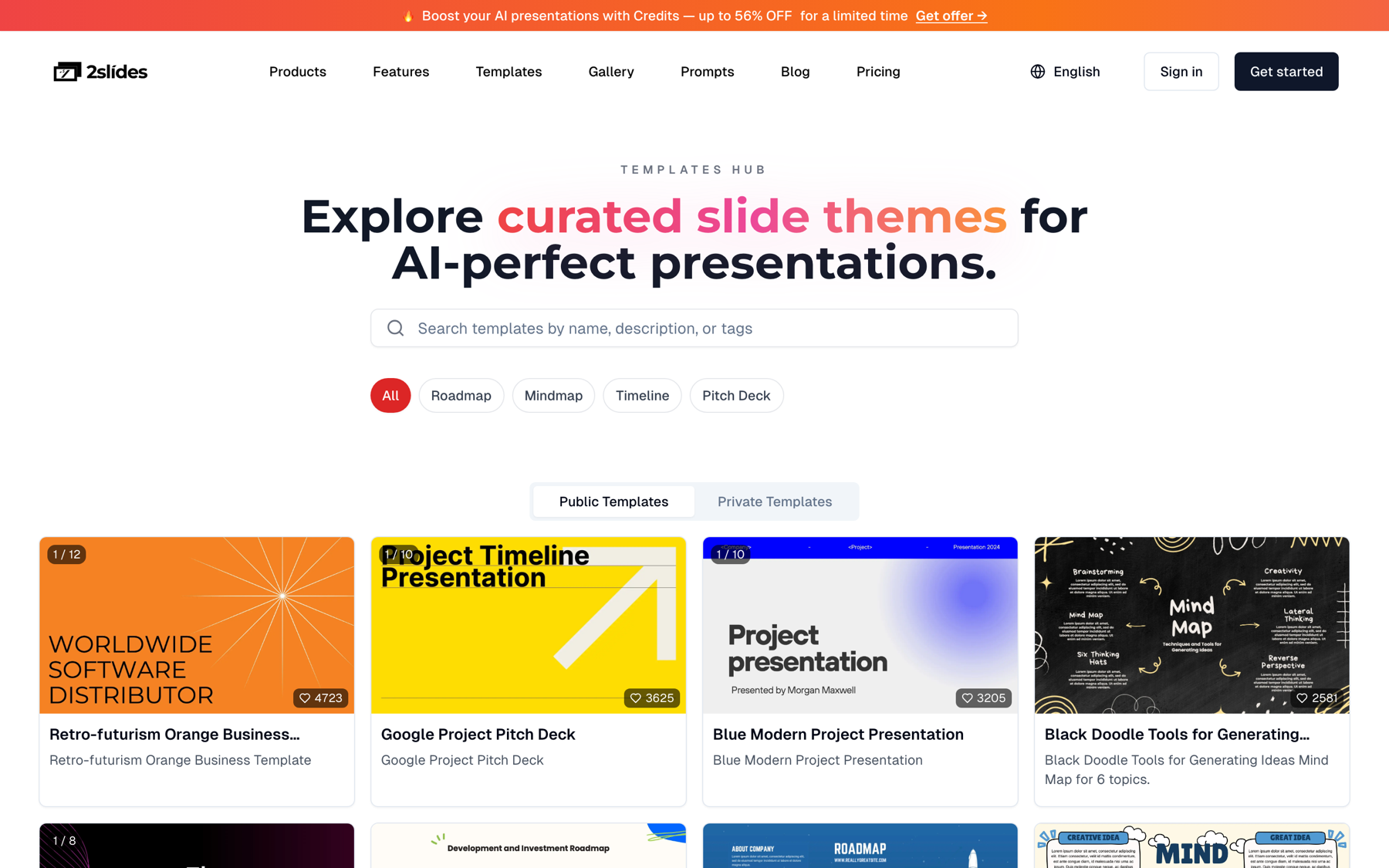
Then resolve the same template to an ID from the API. The search endpoint is free and limited to 6 requests per minute, which is irrelevant here because you call it once.
curl -s "https://2slides.com/api/v1/themes/search?query=pitch%20deck&limit=5" \
  -H "Authorization: Bearer $SLIDES_API_KEY"
The response lists matching templates with their themeId and metadata. Copy the ID into an environment variable (PROPOSAL_THEME_ID) so the Zapier step and the Python script read the same value. Change the template once a year, not per deal.
The API drives the same engine as the Fast PPT web tool: paste content, pick a template, get a PPTX. The endpoint simply does that headlessly for every row in your sheet.
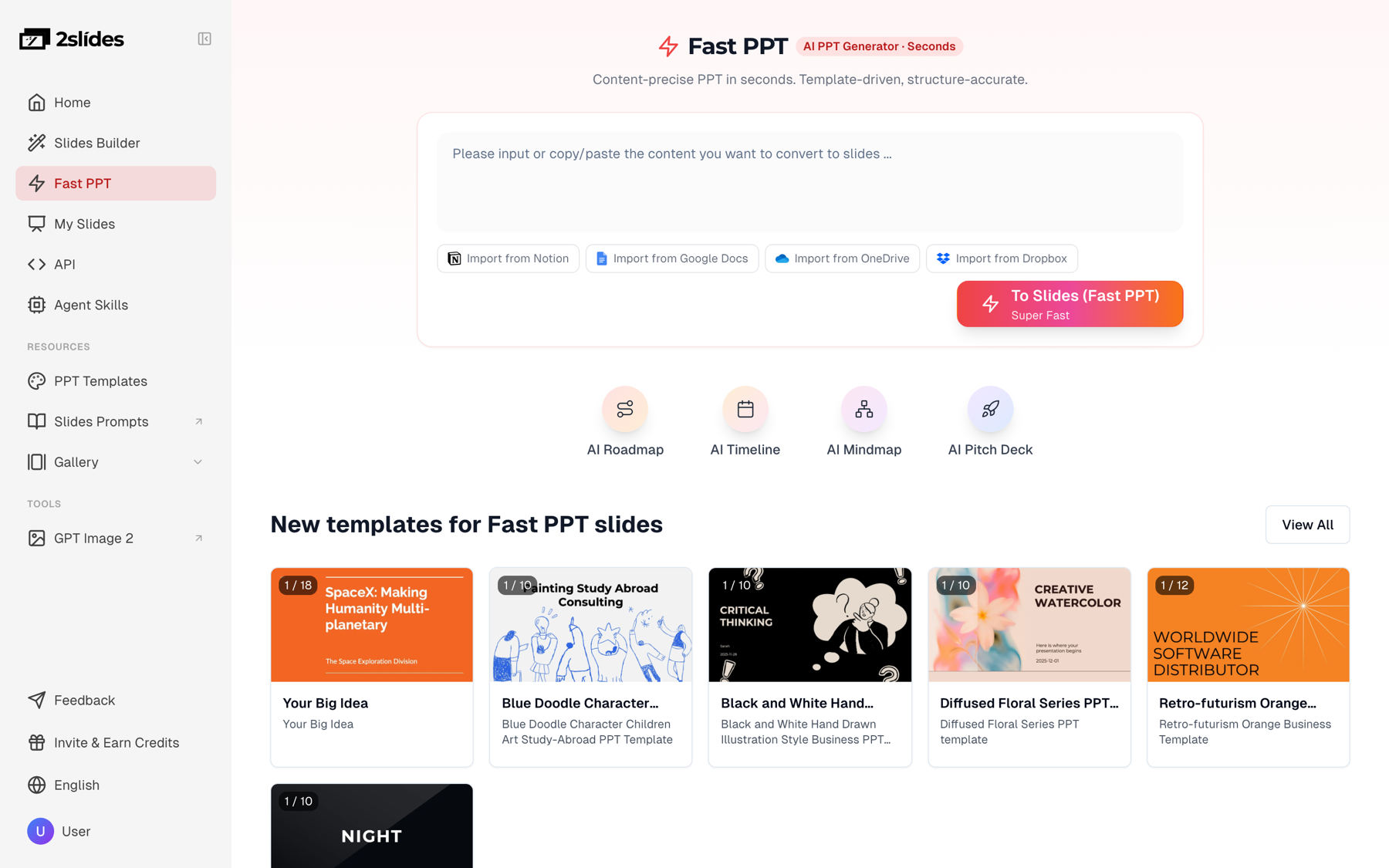
A proposal prompt should be structured, not conversational. Tell the model who the prospect is, what hurts, what you recommend, and what sections to produce in what order. Keep pricing on its own slide so reps can edit it without disturbing the rest of the deck.
Here is the exact call for the first row of the sheet above. Note responseLanguage comes from the row, and mode is "async" so the call returns immediately with a job ID.
curl -s -X POST https://2slides.com/api/v1/slides/generate \
  -H "Authorization: Bearer $SLIDES_API_KEY" \
  -H "Content-Type: application/json" \
  -d '{
    "userInput": "Sales proposal for Northwind Logistics (freight and logistics). Prepared for Mariana Ruiz, VP Operations. Pain points: manual dispatch scheduling; 18% empty-mile rate; no live ETAs for customers. Recommended plan: Growth tier at USD 1,800/month for 25 dispatcher seats. Structure: 1) Our understanding of Northwind Logistics 2) Goals for the next 12 months 3) Proposed solution mapped to each pain point 4) 90-day rollout plan 5) Pricing (own slide) 6) Next steps. Consultative tone, no buzzwords.",
    "themeId": "'"$PROPOSAL_THEME_ID"'",
    "responseLanguage": "Spanish",
    "mode": "async"
  }'
Every 2Slides response is wrapped in the same envelope, which matters when you map fields in Zapier:
{ "success": true, "data": { "jobId": "a1b2c3d4", "status": "pending" } }Poll the job every 5 to 10 seconds. Fast PPT decks usually finish in about 30 seconds.
curl -s https://2slides.com/api/v1/jobs/a1b2c3d4 \
  -H "Authorization: Bearer $SLIDES_API_KEY"
# { "success": true, "data": { "jobId": "a1b2c3d4", "status": "success", "downloadUrl": "https://..." } }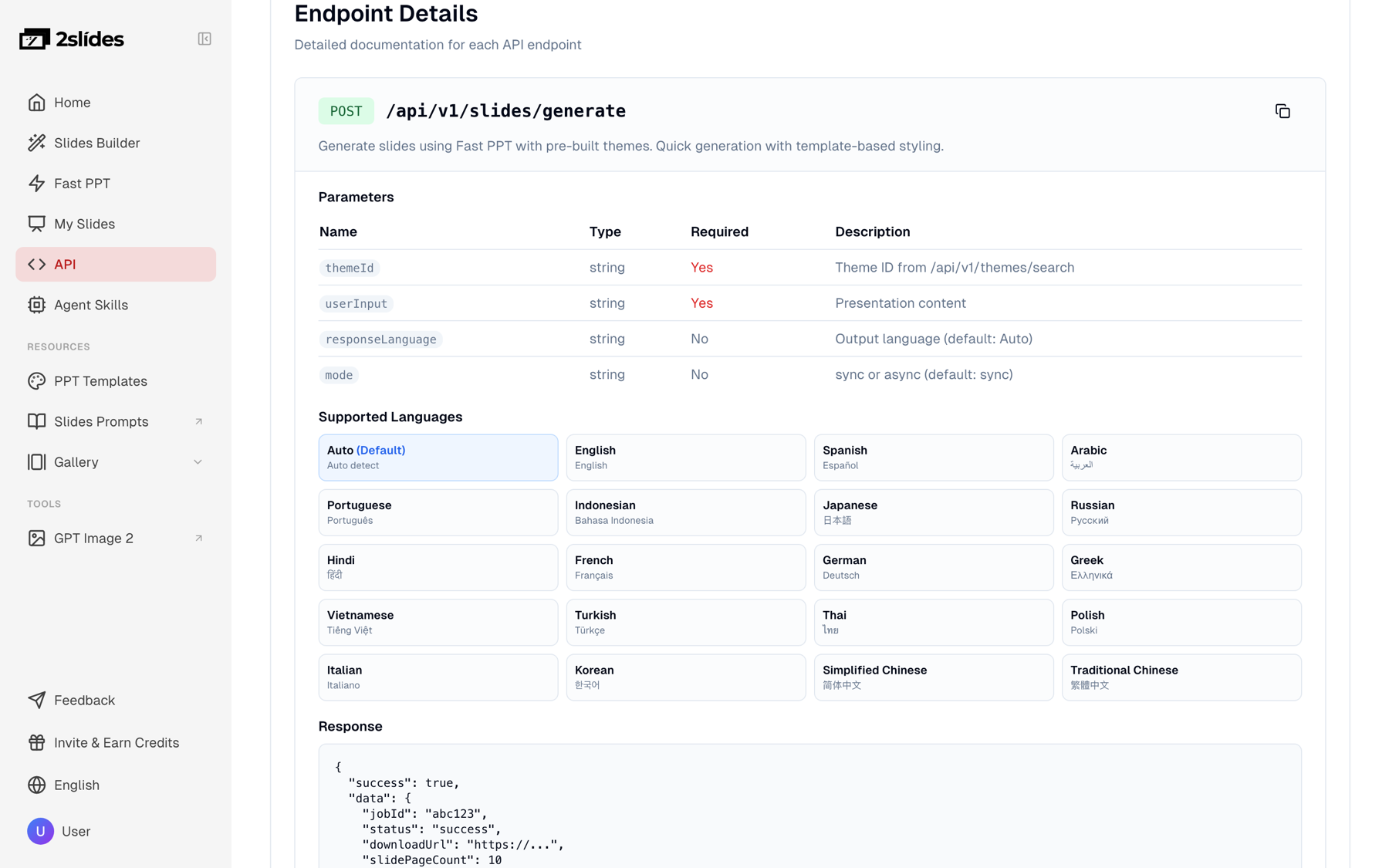
If you leave mode out, the endpoint runs synchronously and returns downloadUrl in the same response. That is simpler for one-off calls, but async is safer when a platform like Zapier has a short HTTP timeout, and it is the right choice for batches.
For teams without an engineer on call, Zapier gets a proposal into the rep's inbox within two minutes of a row being marked ready. The Webhooks by Zapier app makes the two API calls; everything else is standard steps.
status equals ready continue.userInput from the row columns (snippet below).https://2slides.com/api/v1/slides/generate. Header Authorization: Bearer <your key>, JSON body with userInput, themeId, responseLanguage, mode: "async". Map data.jobId from the response.https://2slides.com/api/v1/jobs/{{jobId}} with the same header. Map data.status and data.downloadUrl.data.status equals success. For the rare job still processing, a second Delay plus GET pair covers it.rep_email with the prospect name in the subject and downloadUrl in the body or the attachment field.jobId, downloadUrl, and set status to done.The Code step keeps prompt logic in one place, so a sales manager can change the proposal structure without touching the webhook:
// Code by Zapier (JavaScript). inputData fields are mapped from the sheet row.
const {
  company, industry, contact_name, contact_title,
  pain_points, pricing_tier, price, language,
} = inputData;

const userInput = [
  `Sales proposal for ${company} (${industry}).`,
  `Prepared for ${contact_name}, ${contact_title}.`,
  `Pain points: ${pain_points}.`,
  `Recommended plan: ${pricing_tier} tier at ${price}.`,
  `Structure: 1) Our understanding of ${company} 2) Goals for the next 12 months`,
  `3) Proposed solution mapped to each pain point 4) 90-day rollout plan`,
  `5) Pricing (own slide) 6) Next steps. Consultative tone, no buzzwords.`,
].join(" ");

output = { userInput, responseLanguage: language || "English" };
Keep the API key in the Webhooks step header, never in the sheet. If several reps mark rows ready at the same time, Zapier may fire more than 6 generate calls in a minute; the extra calls receive a rate-limit error and Zapier's built-in replay handles them. For steadier volume, use the Python batch below. The same Zapier pattern is used for recurring decks in automating weekly report slides with Zapier and 2Slides.
When a campaign needs 200 proposals by Monday, run a script instead of firing 200 Zaps. The script below reads a CSV export of the sheet (File, Download, CSV), submits jobs in batches of 6 to respect the 6 requests per minute limit on generate, polls each job with a 6-second gap to stay under the 10 requests per minute limit on jobs, downloads each PPTX, and writes results to a second CSV your Gmail merge or CRM import can consume.
import csv, os, time, requests

API = "https://2slides.com/api/v1"
HEADERS = {
    "Authorization": f"Bearer {os.environ['SLIDES_API_KEY']}",
    "Content-Type": "application/json",
}
THEME_ID = os.environ["PROPOSAL_THEME_ID"]  # from GET /themes/search?query=pitch deck
BATCH = 6        # generate: 6 requests/min per key
POLL_GAP = 6     # jobs: 10 requests/min -> one poll every 6 s
OUT_DIR = "proposals"


def build_prompt(row):
    return (
        f"Sales proposal for {row['company']} ({row['industry']}). "
        f"Prepared for {row['contact_name']}, {row['contact_title']}. "
        f"Pain points: {row['pain_points']}. "
        f"Recommended plan: {row['pricing_tier']} tier at {row['price']}. "
        f"Structure: 1) Our understanding of {row['company']} 2) Goals for the next 12 months "
        f"3) Proposed solution mapped to each pain point 4) 90-day rollout plan "
        f"5) Pricing (own slide) 6) Next steps. Consultative tone, no buzzwords."
    )


def submit(row):
    r = requests.post(f"{API}/slides/generate", headers=HEADERS, timeout=60, json={
        "userInput": build_prompt(row),
        "themeId": THEME_ID,
        "responseLanguage": row.get("language") or "English",
        "mode": "async",
    })
    r.raise_for_status()
    body = r.json()                      # { success, data: { jobId, status } }
    if not body.get("success"):
        raise RuntimeError(body)
    return body["data"]["jobId"]


def poll(job_id):
    r = requests.get(f"{API}/jobs/{job_id}", headers=HEADERS, timeout=30)
    r.raise_for_status()
    return r.json()["data"]              # { jobId, status, progress, downloadUrl }


def download(url, path):
    with requests.get(url, stream=True, timeout=120) as r:
        r.raise_for_status()
        with open(path, "wb") as f:
            for chunk in r.iter_content(65536):
                f.write(chunk)


def main():
    os.makedirs(OUT_DIR, exist_ok=True)
    with open("prospects.csv", newline="", encoding="utf-8") as f:
        rows = [r for r in csv.DictReader(f) if r.get("status") == "ready"]

    results = []
    for i in range(0, len(rows), BATCH):
        batch = rows[i:i + BATCH]
        window_start = time.time()
        pending = {submit(row): row for row in batch}
        print(f"submitted {len(pending)} jobs, {i + len(batch)}/{len(rows)} total")

        while pending:
            for job_id in list(pending):
                time.sleep(POLL_GAP)
                data = poll(job_id)
                if data["status"] == "success":
                    row = pending.pop(job_id)
                    safe = row["company"].replace(" ", "_")
                    path = os.path.join(OUT_DIR, f"{safe}_proposal.pptx")
                    download(data["downloadUrl"], path)
                    results.append({**row, "jobId": job_id,
                                    "downloadUrl": data["downloadUrl"],
                                    "file": path, "status": "done"})
                elif data["status"] == "failed":
                    row = pending.pop(job_id)
                    results.append({**row, "jobId": job_id, "downloadUrl": "",
                                    "file": "", "status": "failed"})

        # Never more than 6 generate calls inside any 60-second window.
        elapsed = time.time() - window_start
        if elapsed < 60:
            time.sleep(60 - elapsed)

    with open("proposals_out.csv", "w", newline="", encoding="utf-8") as f:
        w = csv.DictWriter(f, fieldnames=list(results[0].keys()))
        w.writeheader()
        w.writerows(results)


if __name__ == "__main__":
    main()
Timing: each batch of 6 takes roughly 60 to 120 seconds including polling, so 200 proposals (34 batches) finish in about 70 minutes on one key. The script is idempotent by status, so if it dies at row 140 you rerun it and only the remaining 60 ready rows are submitted. For larger runs and more queueing patterns, see how to batch-generate presentations with an AI API.
The output of generate is a native PowerPoint file: real text boxes, real tables, the template's master slides. This is the reason to use Fast PPT for proposals rather than an image-rendered deck.
Reps change proposals after they are generated. A discount gets approved, a seat count changes on the call, legal wants a clause on the terms slide, the prospect's logo needs to go on the cover. With an editable PPTX the rep opens the file, edits the pricing slide, and sends it. With a PDF or a deck of rendered images, every one of those changes means regenerating and re-reviewing the whole deck.
The Gmail step (or your CRM's email tool) should therefore send the PPTX itself, not a viewer link, and the subject line should carry the prospect name so reps can find it later. If you also want a polished leave-behind, reps can export to PDF from PowerPoint after their edits.
Before writing the prompt structure in Step 3, it helps to look at real decks. The 2Slides Gallery hosts reference decks you can study for structure, or pass as referenceImageUrl to the create-like-this endpoint if you go the image-designed route. These are reference decks, not output from the API calls above.

Three patterns from strong proposals carry over to your prompt: open with the prospect's situation in their words (the pain_points column), map each solution point to one pain point, and isolate pricing on a single slide. For a deeper look at what goes in each section, see how to create a sales enablement deck with AI.
Fast PPT is billed at 10 credits per page, and a typical proposal runs 10 pages. Theme search and job polling are free.
| Volume | Pages | Credits | Credit packs | USD | Per proposal |
|---|---|---|---|---|---|
| 20 proposals/month | 200 | 2,000 | 1 × $5 (2,000) | $5.00 | $0.25 |
| 500 proposals/month | 5,000 | 50,000 | 1 × $80 (40,000) + 1 × $22.50 (10,000) | $102.50 | $0.21 |
The 500 free credits on signup cover 5 full proposals for testing. Credits are pay-as-you-go with no seat requirement, so one shared key can serve a 12-person sales team.
| Need | Use | Why |
|---|---|---|
| Editable proposals reps will modify | generate (Fast PPT), 10 credits/page | Native PPTX, ~30 s, consistent template |
| Visually bespoke decks for a handful of enterprise accounts | create-pdf-slides, 10 + 100 credits/page at 2K | Image-designed layouts from a style prompt |
| Match an existing brand deck's look | create-like-this with referenceImageUrl, same cost | Derives the design system from a reference image |
| Narrated proposal video for async selling | create-pdf-slides or create-like-this, then generate-narration at 210 credits/page | Fast PPT jobs cannot be narrated |
For the sheet-driven volume flow in this article, Fast PPT is the right default. Reserve the image pipeline for the 5% of deals where design is the differentiator.
responseLanguage wants "Spanish" or "Portuguese", not "es" or "pt-BR". Validate the column with a dropdown in Sheets.generate-narration endpoint only accepts jobs from create-pdf-slides or create-like-this. Proposals from generate are PPTX only.userInput. Summarize first. Three semicolon-separated pain points outperform a wall of notes, and the pricing slide stays clean.data.jobId, not at the top level. The same envelope { success, data: { ... } } applies to the poll response.Yes. The API only needs a userInput string and a themeId, so any source works: a HubSpot workflow, a Salesforce export, or a Postgres query. Google Sheets is convenient because reps can edit rows and mark them ready without engineering help. For a CRM-native trigger on deal stage changes, see the HubSpot pattern linked earlier in this article.
About 30 seconds for a Fast PPT deck once the job starts. In Zapier, a single 60-second Delay before polling is enough in nearly every case. In the Python batch, six proposals submit within a minute and typically all complete within the next minute, so 200 proposals finish in roughly 70 minutes on a single API key.
The design will, which is intended. Because every job uses the same themeId, colors, fonts, and layouts are identical across the batch, and only the content changes per prospect. If you want two looks, say one for enterprise and one for SMB, add a theme column to the sheet and map it to two different themeId values.
Yes. Gamma's API at developers.gamma.app offers similar generation automation, though API keys there require a Pro plan. 2Slides API keys work on any account, including a free one with 500 credits, and the Fast PPT output is a native PPTX rather than a hosted page, which is what makes rep-side edits to pricing slides practical.
Yes, that is the main reason to use the Fast PPT path. The file is a standard PPTX with editable text boxes and tables, so a rep can change seat counts, apply an approved discount, or add a legal clause in PowerPoint or Google Slides. No regeneration is needed, and the rest of the deck stays untouched.
Personalized sales proposals at scale come down to three parts: a clean sheet, one fixed template, and a queue that respects 6 requests per minute.
Create stunning AI-powered presentations in seconds. Transform your ideas into professional slides with 2slides AI Agent.
Try For FreeYour AI Agent for slides. Save time, shine faster with intelligent presentation creation.




© 2026 2slides. All rights reserved.