2Slides Team
13 min read

Quick answer: To turn a photo into paper or fabric art, pick the material first. Use Torn Paper Collage for streets and courtyards, Paper Cut for colorful travel scenes, and Fabric Collage for wide landscapes. Four of the seven effects in this guide passed every test run. A 2K image costs 100 credits, about $0.25.
Paper and fabric art look handmade because they are physical. Torn paper has fibers on its edges. Cut card has thickness and casts a shadow. Fabric has a weave and visible stitches. A simple filter cannot add these details, because it only changes the pixels that are already there.
On 2Slides Photo Effect Tools, each effect is a separate, fully written image prompt for one material. Most effects return a poster with your original photo on one half and the same scene rebuilt in that material on the other half. This guide covers seven effects: five paper and collage styles, and two textile styles.
The best effect depends on the material you want and the photo you have. Paper effects suit scenes with depth and clear shapes. Textile effects suit one clear subject. The table shows the material, the best photo, the photo shape each effect expects, and how many test runs were clean.
| Effect | Material | Best photo | Photo shape | Poster shape | Clean runs |
|---|---|---|---|---|---|
| Torn Paper Collage Poster | Hand-torn paper, card and kraft | A lane, courtyard, temple roof or bridge | Landscape (3:2) | 3:4 | 6/6 |
| Torn Paper Reveal Poster | Paper scraps inside one tear | One landmark with a clear silhouette | Landscape (3:2) | 3:4 | 4/6 |
| Paper Cut Travel Poster | Layered cut card | Daylight travel scene with clear blocks of color | Landscape (4:3) | 2:3 | 4/5 |
| Geometric Collage Poster | Large flat paper shapes | One subject with a clear silhouette | Landscape (3:2) | 3:4 | 5/6 |
| Fabric Collage Poster | Cloth scraps stitched on linen | Wide landscape with a clear horizon | Wide landscape (3:2) | 3:2 | 6/6 |
| Embroidery Patch Poster | Hand embroidery on linen | One object in soft light | Landscape (3:2) | 3:4 | 6/6 |
| Needle Felt Travel Poster | Needle-felted wool | One subject, especially an animal | Landscape (4:3) | 2:3 | 6/6 |
At 2K, a 3:4 poster is 1792 × 2400 pixels, a 2:3 poster is 1696 × 2528, and a 3:2 image is 2528 × 1696. 4K doubles each side.
Before an effect goes live, we generate it several times on fixed test photos and check every result against written rules. Torn Paper Collage, Fabric Collage, Embroidery Patch and Needle Felt each passed all six of their runs. Across all seven effects in this guide, 37 of 41 runs were clean (90%). The average across all 35 effects is 83%.
This is a good result, but the samples are small. Six runs on one test photo cannot prove that an effect never fails. Zero failures in six runs is still consistent with a real failure rate of one in three or more. Most of these effects were also tested on the same photo, a cat on a rural railway platform, which is not the ideal subject for every style. Treat the numbers as "forgiving" rather than "perfect."
For results across all 35 styles, see our comparison of AI photo-to-art styles.
The Torn Paper Collage Poster rebuilds your scene from hand-torn paper. Facades, roofs, roads and plants are each torn from a different paper: matte fiber paper, rice paper, corrugated card or kraft. The edges show fibers, and each layer casts a short shadow. It works best on scenes with depth.
Three details make this effect different:
Choose a photo with one clear line going into the distance and a few objects that are easy to recognize, such as a lantern, an umbrella, a sign or a person.
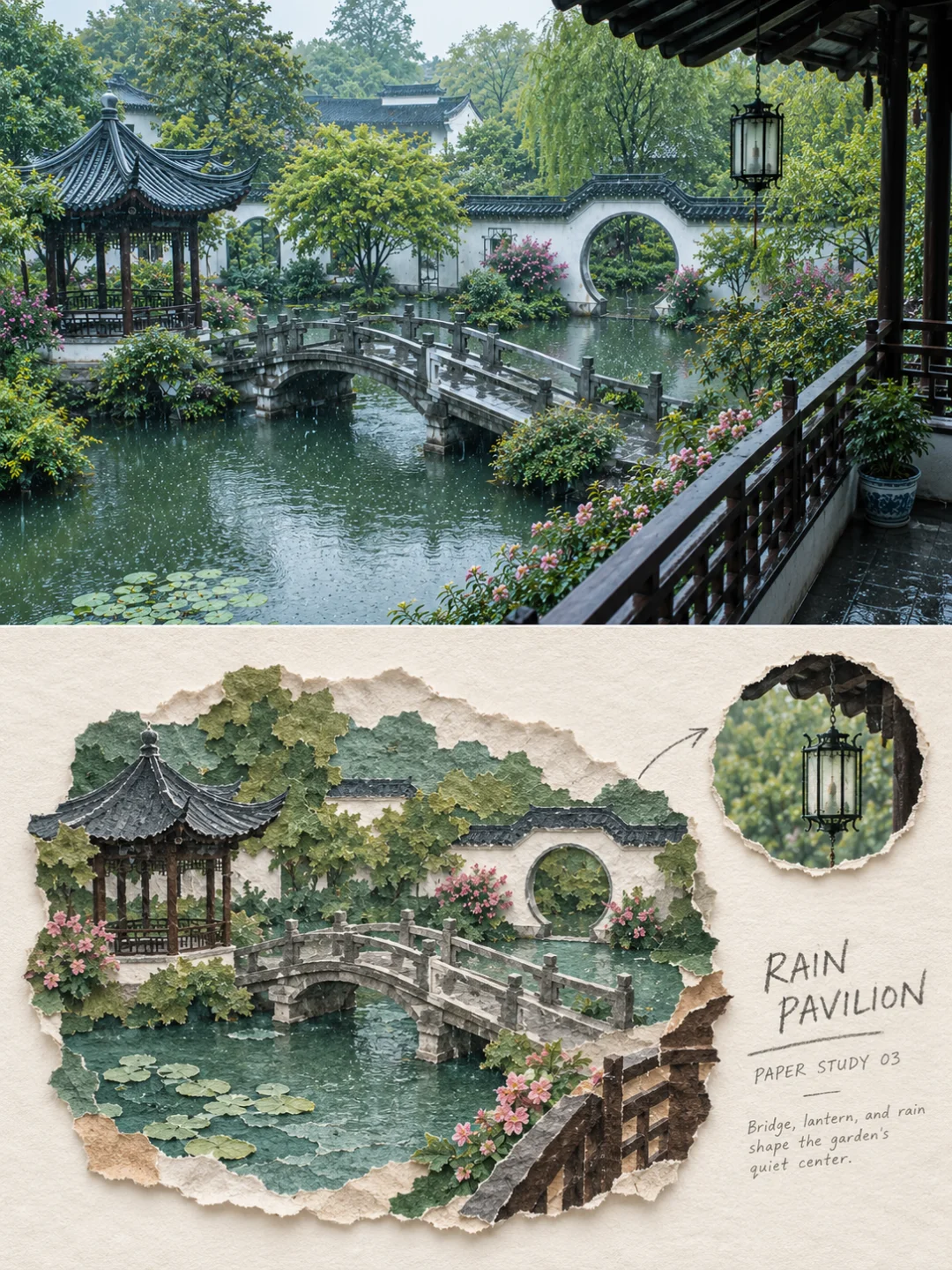
A pavilion and a stone bridge in rain. The lily pads are torn from thin green paper, and the lantern is enlarged in the inset.
The Torn Paper Reveal Poster leaves the lower half mostly empty. One ragged tear runs through the middle of a cream sheet, and inside the tear you see your scene, rebuilt from flat blocks of color and paper scraps. It suits one recognizable landmark: a tower, a temple, a snowy peak or a town by the sea.
Two things to know before you generate:
The Paper Cut Travel Poster cuts paper instead of tearing it. Every building, tree, boat or animal becomes its own piece of card, with a crisp edge, visible thickness and a soft shadow. The result looks like a small paper diorama. The colors come from your photo and are softened, not grayed.
It is a good choice for bright travel photos with clear blocks of color: a row of painted houses, a harbor with boats, animals in a field. It is a poor choice for night photos, crowds and portraits.
In testing, it passed 4 of 5 runs. The one failure drained the color, so a red-brick castle came out cream and gray. Note that the test photo came from the creator's own sample set, which is a favorable case.
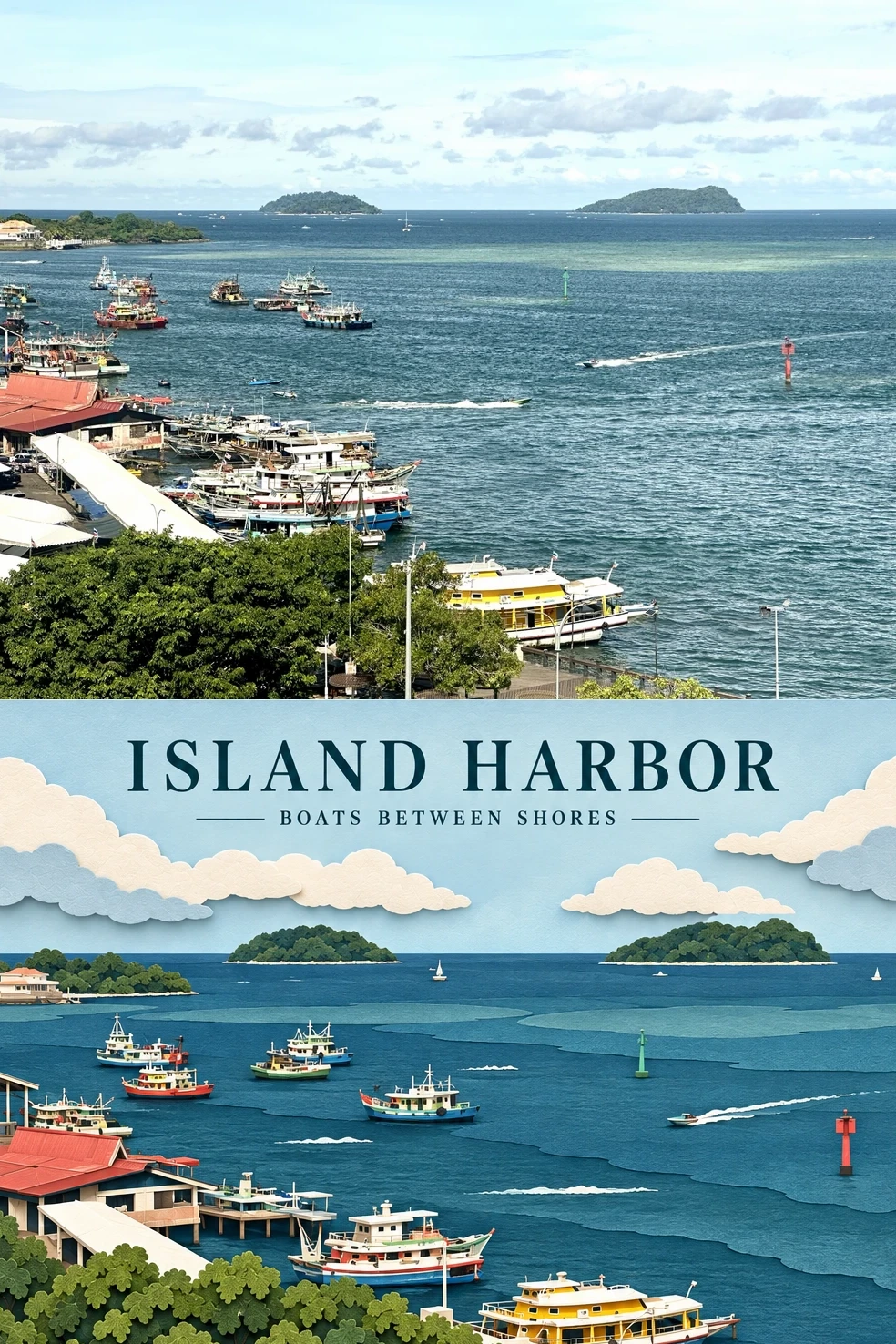
The ferries, the red marker buoy and the two islands keep their places. The sea becomes stacked bands of blue paper.
Torn paper or paper cut? Torn paper has ragged edges, visible fibers and a looser look. Paper cut has clean edges, flat card and neat layers. Choose torn paper for old streets and gardens. Choose paper cut for bright, colorful scenes.
The Geometric Collage Poster rebuilds your subject from a small number of large shapes: rectangles, circles, triangles and ellipses. The palette uses two to four soft colors taken from your photo. The background is reduced to one to three elements, and a short headline sits in the white space.
Because it uses a few large shapes instead of many small pieces, it is the only effect in this guide whose samples include portraits of people. However, our test run used a cat photo, not a face, so results on faces are not yet tested. It passed 5 of 6 runs. The one failure replaced the photo in the top half with a different scene.
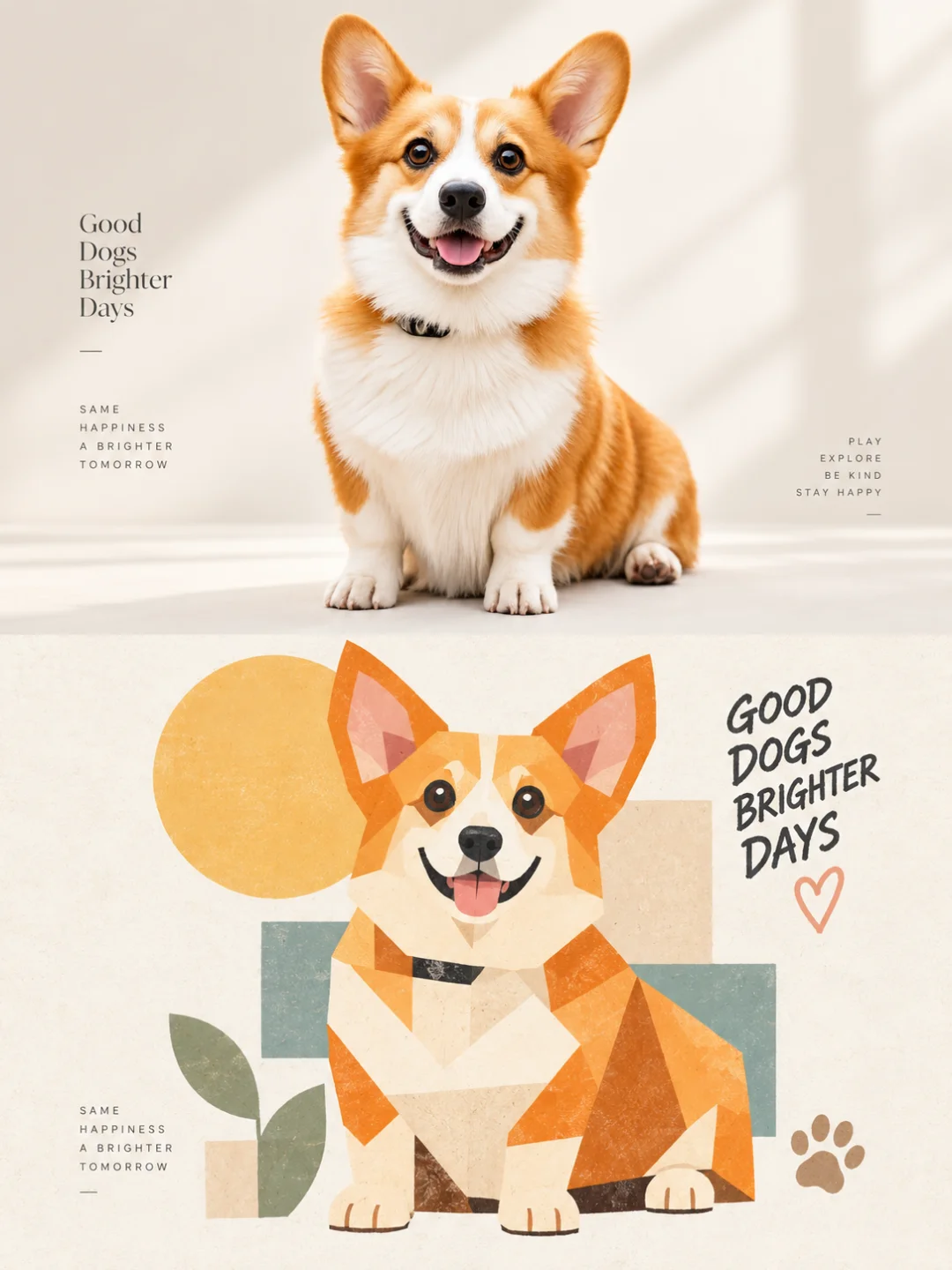
A corgi on a cream background. The whole dog is rebuilt from about twenty wedges and a circle.
The Fabric Collage Poster works differently from the other effects. It does not include your original photo. The whole image is one piece of textile art: your scene cut from gingham, linen and washed burlap, sewn onto a wide, narrow patchwork panel on a beige linen background. The panel edges are torn and frayed, and some shapes extend past them.
It needs a wide landscape photo with a clear horizon and a few large areas of color, such as sky, sea and fields. Vertical photos do not fit, because the output is a horizontal 3:2 image. It passed 6 of 6 test runs. One detail did not match the prompt: in five runs, the small line of text looked printed rather than stitched in thread.
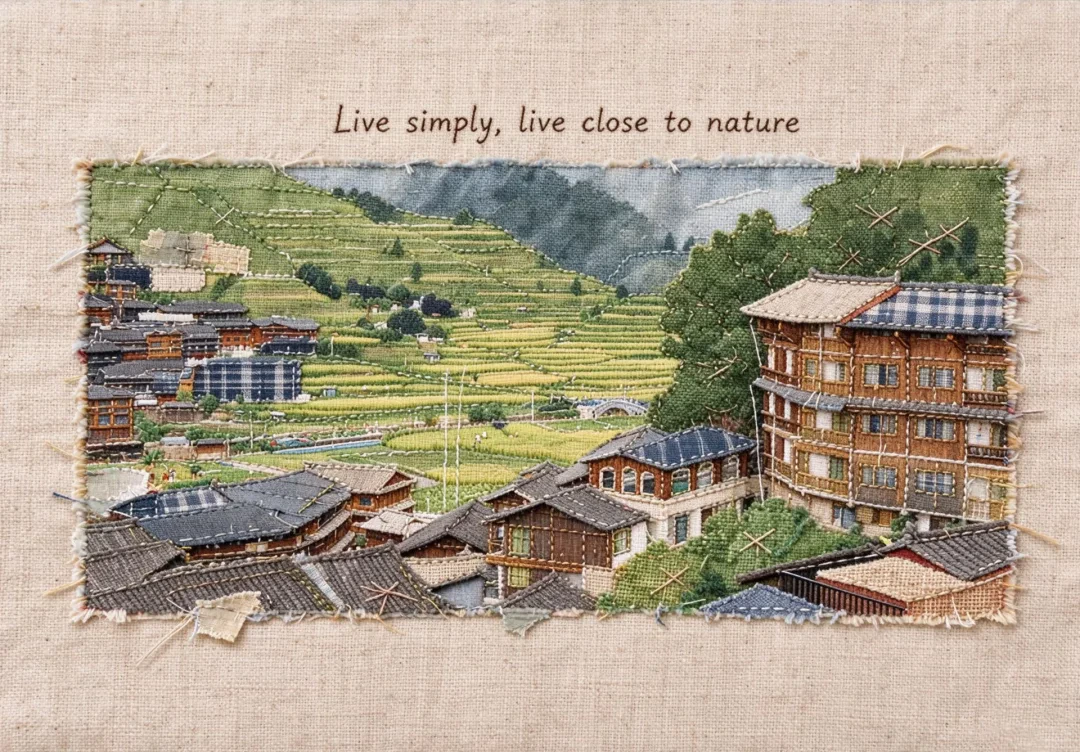
The terraces become stacked bands of green cloth, and the timber houses keep their roof lines in dark thread.
The two textile effects suit one clear subject rather than a full scene. Both passed 6 of 6 test runs.
The Embroidery Patch Poster stitches one object onto natural linen in satin stitch, stem stitch and long-and-short stitch. It looks like a museum specimen card, with a headline, a "PATCH NO." line and a short description. The patch number is generated for you. Use a photo of one object in soft light: a leaf, a pine cone, a flowering branch, a bird or a shell. In half of the test runs, it also stitched some of the background around the subject.
The Needle Felt Travel Poster rebuilds the place as a small wool miniature on ivory felt, with fluffy fibers and raw edges. It handles animals especially well, because wool works well for fur. The prompt asks for a small scene with a lot of empty felt around it, but in every test run the scene came out larger than requested. Expect it to fill more of the lower half.
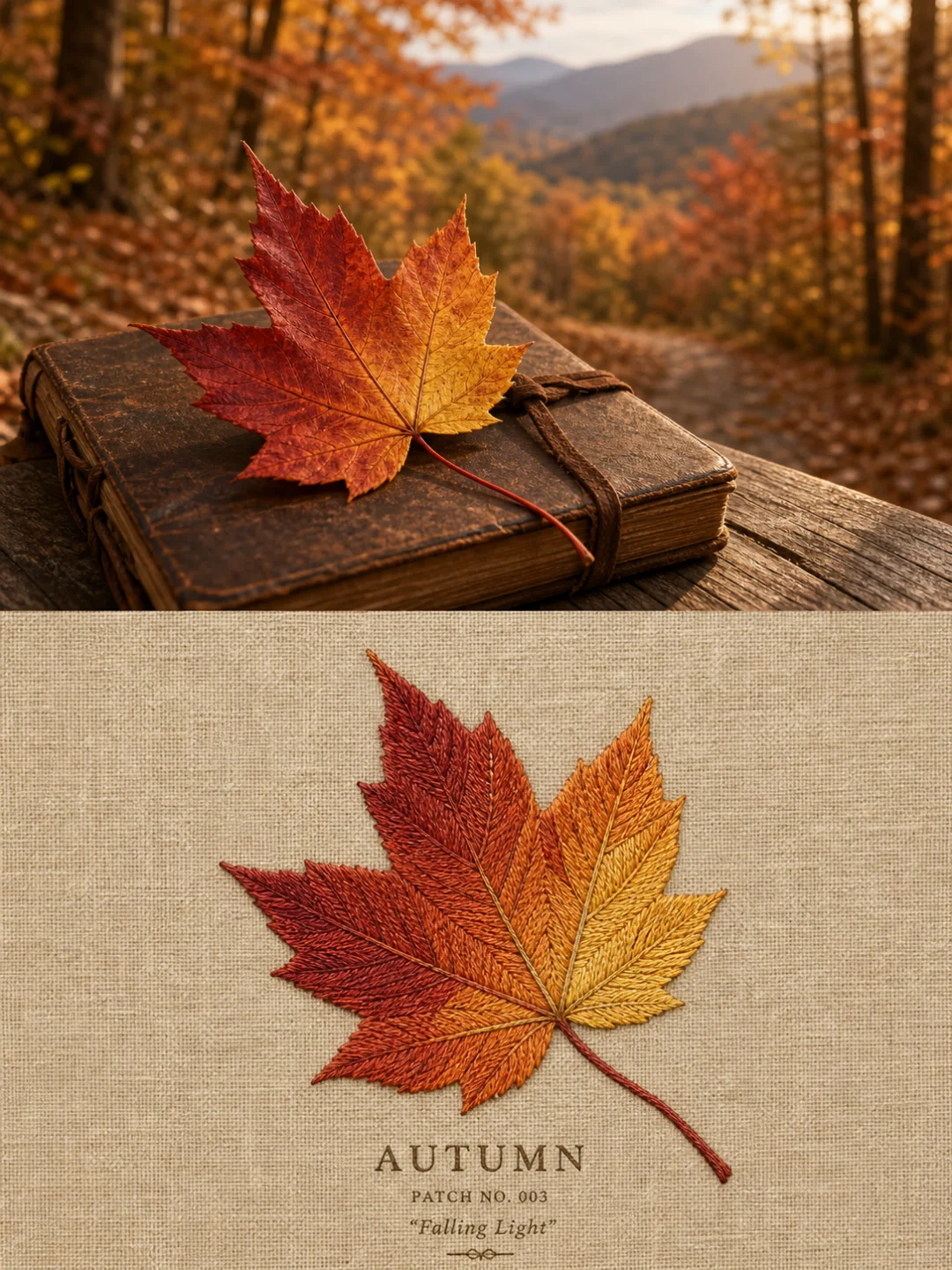
A maple leaf on an old book. The veins are stem stitch, and the leaf shades from red into gold.
All seven effects simplify your photo into flat pieces of material. Photos with clear shapes and a few strong colors work best. Close-up portraits work worst, because paper, cloth and wool cannot hold the details of a face.
Good photos:
Poor photos:
You need an account only to generate. New accounts get 500 free credits, enough for five 2K images.
You can try the Torn Paper Collage Poster with the 500 free credits that every new account receives. That covers five 2K images. The full prompt is also published on the effect page, so you can copy it into an image-to-image model such as Nano Banana or GPT Image 2.
Upload the photo to one of the collage effects, type a short title, and generate. Most of these effects place your photo in the top half and a collage version of the same scene in the bottom half. Fabric Collage is the exception: it returns only the textile artwork.
Not well. Paper cut simplifies everything into flat layers, so faces lose their likeness. For a photo with a person or a pet, Geometric Collage is the better choice, although its results on faces have not been tested yet.
Torn paper has ragged, fibrous edges and a loose, handmade look. Paper cut has clean edges and neat stacked layers, like a paper diorama. Both rebuild your scene from separate pieces of paper.
Yes. The model sets the text you type, in any language. Keep it short, because the text is small on most of these posters. If you leave the field blank, several effects write English text, but Torn Paper Reveal writes Chinese.
Yes. The images you generate are yours to use, including for commercial purposes. Your uploaded photo is stored privately, deleted on a schedule, never made public and never used to train a model.
Choose the material first, then choose the photo that suits it. Torn paper and paper cut need depth and clear shapes. Fabric collage needs a wide horizon. Embroidery and needle felt need one clear subject. If you are not sure where to start, try the Torn Paper Collage Poster. It passed every test run and works on most street, garden and temple photos.
Create stunning AI-powered presentations in seconds. Transform your ideas into professional slides with 2slides AI Agent.
Try For Free


