2Slides Team
10 min read

Spend an hour in r/Anki, r/languagelearning, or any serious learner's Discord, and the same argument shows up: Anki vs visual cards. Some people swear Anki is the only tool that matters. Others say Anki is dry, text-heavy, and kills motivation after a month. Both camps are right — about different parts of the language learning loop.
This guide explains where each tool wins, where each fails, and the hybrid workflow that's quietly outperforming pure-Anki and pure-slides setups in 2026.
Anki is a spaced repetition system (SRS). It does one thing extremely well: scheduling card reviews on the optimal interval so memories consolidate without wasted reps. The math behind it is decades old (Hermann Ebbinghaus, Pimsleur, SuperMemo) and Anki's free implementation is the gold standard.
What Anki is not good at:
If you've used Anki for 90 days and started to dread opening it, the dread is almost never about review — it's about the cards you built being boring. Text-only cards reviewed 200 times feel like punishment.
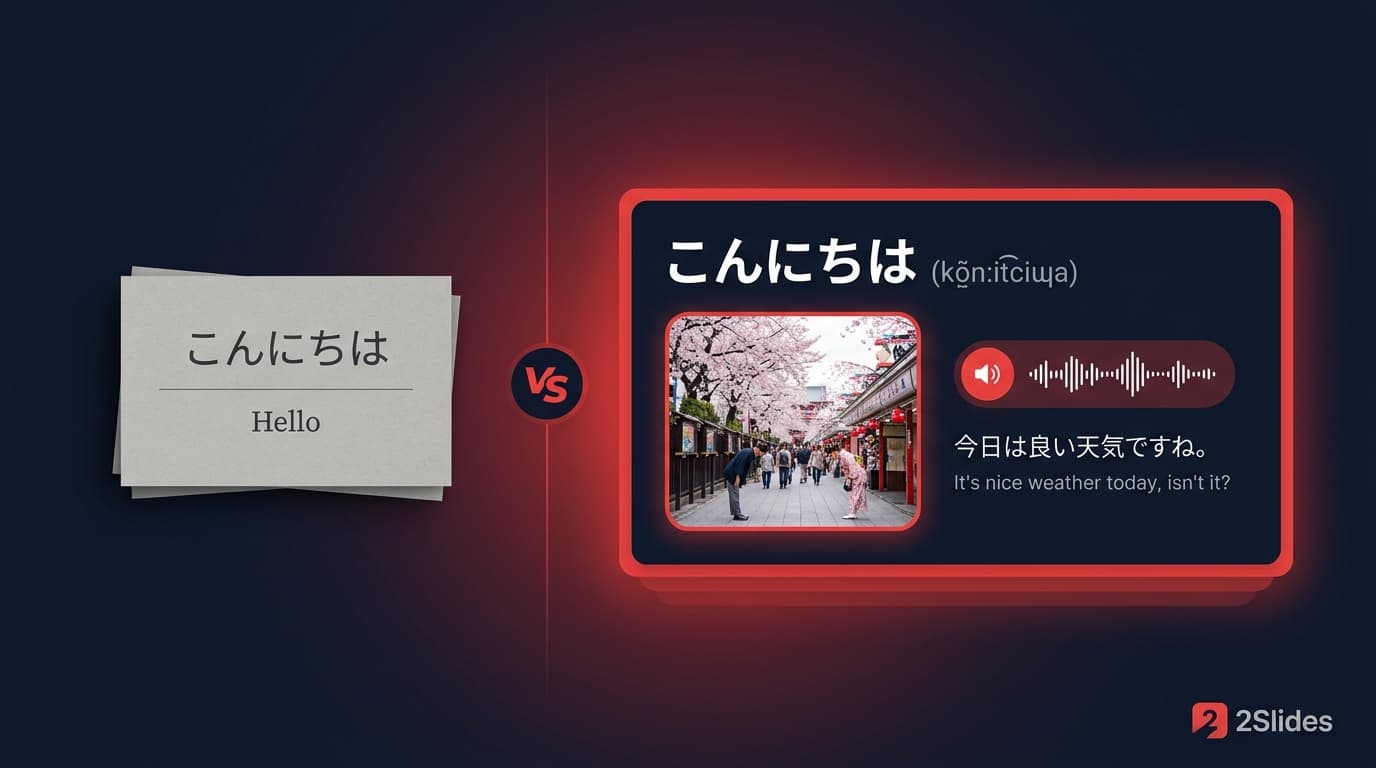
A visual vocabulary slide is an image-rich, full-slide card containing the target word, its translation, IPA, an illustrative image, and one or two example sentences in context. A deck of 30 such slides can be:
What visual vocabulary slides are not good at:
| Job to be done | Anki wins | Slides win |
|---|---|---|
| Long-term retention of 5,000+ vocabulary items | ✅ | |
| Daily 20-minute spaced-repetition review | ✅ | |
| First exposure to 30 new words for next week's class | ✅ | |
| Creating cards fast (image + IPA + audio + 2 sentences) | ✅ | |
| Classroom projection | ✅ | |
| Printable study sheet | ✅ | |
| 9:16 narrated review video for TikTok/Reels | ✅ | |
| LMS upload (Canvas, Moodle) | ✅ | |
| Tracking which cards are "due" today | ✅ | |
| Sharing a single deck with a friend | partial (file) | ✅ |
| Making vocabulary feel like content, not chores | ✅ |
The pattern: Anki owns scheduling and long-tail retention. Slides own creation, first exposure, and any time the cards leave the learner's screen.
Symptoms: thousands of mature cards, scheduled reviews completed every morning, but actual conversation ability hasn't moved in six months. The cards are atomic facts; the brain treats them as flashcard trivia, not as a language. The learner can recognize a word when prompted but cannot produce it in speech.
Cause: cards built without context, images, or variety. SRS optimizes for what's on the card. If the card is a word and a translation, that's what the brain remembers — a word and a translation, not a usable language unit.
Fix: rebuild the cards with example sentences, images, and audio. Visual slides solve the creation pain.
Symptoms: a beautiful deck of 30 cards, viewed once, never reviewed again. Three weeks later the learner can't recall any of the words.
Cause: slides are a delivery format. Without spaced repetition, exposure is one-shot.
Fix: after reviewing the slide deck, push the same word list into Anki for the SRS layer. The slides did the heavy lifting on creation; Anki keeps the words alive.
Symptoms: learner builds rich slides, then tries to cram every screenshot into Anki as image cards. Anki bloats, sync gets slow, the cards lose the structure the slides had.
Fix: don't put the slides into Anki. Put the word list into Anki as text cards (with one good example sentence). Use slides for first exposure and review videos. Use Anki for SRS. Two tools, two jobs.
A repeatable weekly loop, used by serious learners, classroom teachers running ESL programs, and faceless language-learning content creators:
A learner running this loop hits each word from at least three angles: visual slide, narrated audio, retrieval rep. Three angles per word beats fifty reps of the same flat text card.
Tight deadline, large lexicon. Slides for the visual + audio first pass on each weekly thematic batch. Anki for the long tail of academic vocabulary.
Burned out on dry text cards. Switch to visual slides for first exposure and a daily MP4. Re-introduce Anki after 2–3 months of slide-driven momentum, with rebuilt cards that include the slides' example sentences. The reintroduction is much easier when the cards are no longer the boring kind.
Classroom needs visual cards on the projector. Optional: hand the same deck as a 9:16 MP4 to students for at-home review. SRS is each student's own homework — recommend Anki or Quizlet but don't enforce it.
Same workflow, but the visual slide deck is the content product. Each week's 30-word deck becomes a TikTok video, an Instagram carousel, and a $5 PDF lead magnet. The creator's own learning loop (if any) is a side benefit.
Parents teach a heritage language at home. Slide decks are great for dinner-table review (project on a tablet, narrate together). Anki is overkill for child learners. Drop Anki entirely; the slides + repetition through real conversation does the work.
The data structure that makes this clean:
Word | Translation | IPA | ExampleSentence1 | ExampleSentence2 | ImageURLSlides display all six columns visually. Anki uses the first four as a text card, optionally embedding the image. The example sentences are the most important transferable element — they're what makes Anki cards feel less robotic.
No. Old Anki cards have value because of the SRS history attached to them. Don't rebuild the past. Build new content as slides + Anki, and let old Anki decks finish their life cycle naturally.
No. Anki is mature, free, open-source, and unmatched for spaced repetition. Visual slide tools are not replacing Anki — they're filling the creation and first-exposure gaps Anki was never designed to fill.
Yes. The argument is the same — slides for creation and first exposure, any SRS tool for scheduling. Quizlet and Knowt have lower friction than Anki for casual learners.
20–40 is the sweet spot. 60 is the upper end for a dense weekly batch. Above 60, attention fades on review.
Re-export the same word list with new example sentences every 4–6 weeks. Same words, fresh visuals and sentences keeps cards from going stale and adds the contextual variety SRS alone can't provide.
Create Slides Like This accepts a word list with a structural prompt. Create Slides from File accepts a vocabulary PDF or glossary. Both produce decks editable in Workspace where you can add narration and export MP4. The full vocabulary-card workflow is in How to Create AI English Vocabulary Cards with Images, Example Sentences, and Audio.
The same workflow works for Spanish, French, German, Japanese, Korean, Mandarin, Hindi, Arabic, Russian, Portuguese, Indonesian, Vietnamese, Thai, Turkish, Italian, Polish, and several more — 22+ languages in total. Translations in the deck are set to whichever native language the learner needs.
Anki and visual slide decks are not competitors. They are two halves of the language learning loop. The learners who plateau are usually missing one half. The ones who break through use both — slides for creation and first exposure, Anki for the long tail.
If you've been pure-Anki for years and you've plateaued, the answer probably isn't more Anki. It's better cards, made faster, in a format you actually enjoy reviewing. That's what the slides are for. Once the cards are alive, Anki keeps them that way for the next decade.
Create stunning AI-powered presentations in seconds. Transform your ideas into professional slides with 2slides AI Agent.
Try For FreeYour AI Agent for slides. Save time, shine faster with intelligent presentation creation.




© 2026 2slides. All rights reserved.