2Slides Team
4 min read

Adding AI presentation generation to your SaaS product can be a powerful differentiator. CRM platforms can generate pitch decks. Analytics tools can export data as slides. LMS platforms can create course materials. This guide shows you how to embed 2Slides' API into your product.
| SaaS Category | Presentation Use Case | Value to Users |
|---|---|---|
| CRM (HubSpot, Salesforce) | Auto-generate pitch decks from deal data | Save reps 2+ hours per deal |
| Analytics (Tableau, Mixpanel) | Export dashboards as presentation slides | One-click stakeholder reports |
| Project Management (Jira, Asana) | Generate project status presentations | Automate weekly updates |
| LMS (Canvas, Teachable) | Create course slides from curriculum | Speed up content creation |
| Marketing (HubSpot, Marketo) | Campaign report presentations | Automate client reporting |
| HR (BambooHR, Workday) | Generate org charts, review presentations | Save HR team time |
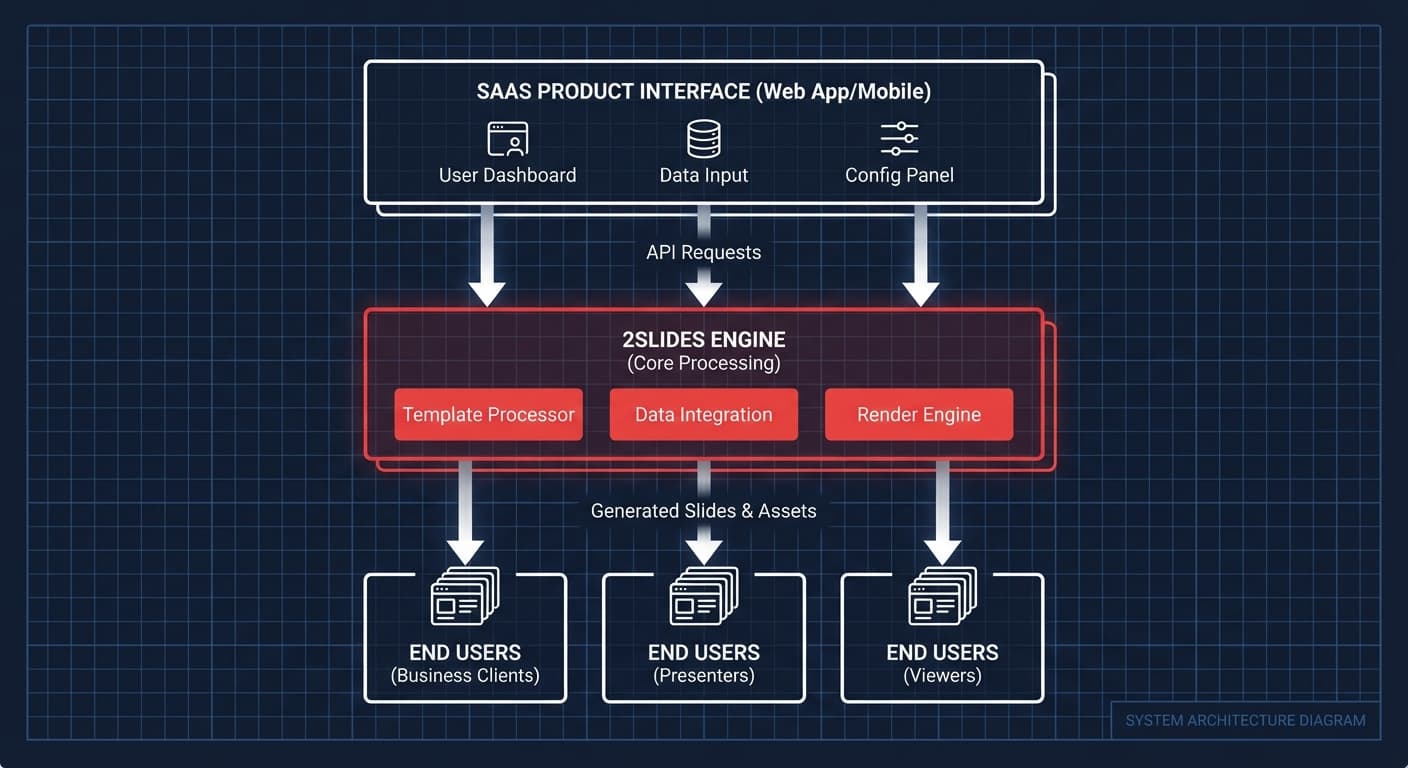
Your SaaS App
    ↓ (user triggers presentation generation)
Your Backend Server
    ↓ (API call with your 2Slides API key)
2Slides API
    ↓ (async job processing)
Your Backend Server (polls for completion)
    ↓ (returns download URL to user)
Your SaaS App (user downloads or views slides)Important: Never expose your 2Slides API key to the client. All API calls should go through your backend.
// Your backend endpoint
app.post('/api/generate-presentation', async (req, res) => {
  const { topic, dataContext, userId } = req.body;

  // Validate user permissions and credit balance
  const user = await getUser(userId);
  if (!user.canGenerateSlides) {
    return res.status(403).json({ error: 'Presentation generation not available' });
  }

  // Call 2Slides API from your server
  const job = await fetch('https://2slides.com/api/v1/slides/generate', {
    method: 'POST',
    headers: {
      'Authorization': `Bearer ${process.env.TWOSLIDES_API_KEY}`,
      'Content-Type': 'application/json'
    },
    body: JSON.stringify({
      userInput: topic,
      themeId: user.preferredTheme,
      mode: 'async'
    })
  }).then(r => r.json());

  // Store job reference in your database
  await saveJob(userId, job.jobId);

  res.json({ jobId: job.jobId, status: 'processing' });
});Bundle presentation credits into your existing plans:
Sell presentation generation as a separate add-on:
Pass costs through with markup:
Assign different themes to different customers:
const customerThemes = {
  'acme-corp': 'mckinsey-theme-id',
  'startup-xyz': 'apple-theme-id',
  'enterprise-inc': 'corporate-theme-id'
};Store each customer's brand reference image and use it for all their presentations:
const brandAssets = await getBrandAssets(customerId);
// Use customer's brand slide as reference for all their presentationsRespect each customer's language settings:
const language = customer.locale || 'en'; // 22+ languages supportedYes — the generated PowerPoint files contain no 2Slides branding. They appear as standard .pptx files your users can edit in PowerPoint.
Implement graceful degradation — show users a "generation temporarily unavailable" message and queue the request for retry.
Yes — one API key serves your entire platform. Track usage per customer in your own system.
Add presentation generation to your product — get API access at 2Slides.
Create stunning AI-powered presentations in seconds. Transform your ideas into professional slides with 2slides AI Agent.
Try For FreeYour AI Agent for slides. Save time, shine faster with intelligent presentation creation.




© 2026 2slides. All rights reserved.