2Slides Team
3 min read

การเพิ่มฟีเจอร์การสร้างงานนำเสนอด้วย AI เข้ากับผลิตภัณฑ์ SaaS ของคุณสามารถเป็นจุดแข็งที่โดดเด่นได้ แพลตฟอร์ม CRM สามารถสร้างเดคการนำเสนอขาย เครื่องมือวิเคราะห์ข้อมูลสามารถส่งออกข้อมูลเป็นสไลด์ แพลตฟอร์ม LMS สามารถสร้างสื่อการเรียนการสอน คู่มือนี้จะแสดงวิธีการผสานรวม API ของ 2Slides เข้ากับผลิตภัณฑ์ของคุณ
| ประเภท SaaS | กรณีการใช้งานงานนำเสนอ | คุณค่าต่อผู้ใช้ |
|---|---|---|
| CRM (HubSpot, Salesforce) | สร้างเดคการนำเสนอขายอัตโนมัติจากข้อมูลดีล | ประหยัดเวลาพนักงานขายมากกว่า 2 ชั่วโมงต่อดีล |
| Analytics (Tableau, Mixpanel) | ส่งออกแดชบอร์ดเป็นสไลด์นำเสนอ | สร้างรายงานสำหรับผู้มีส่วนได้ส่วนเสียได้คลิกเดียว |
| Project Management (Jira, Asana) | สร้างงานนำเสนอสถานะโครงการ | ทำให้การอัปเดตรายสัปดาห์เป็นอัตโนมัติ |
| LMS (Canvas, Teachable) | สร้างสไลด์บทเรียนจากหลักสูตร | เร่งความเร็วในการสร้างเนื้อหา |
| Marketing (HubSpot, Marketo) | งานนำเสนอรายงานแคมเปญ | ทำให้การรายงานลูกค้าเป็นอัตโนมัติ |
| HR (BambooHR, Workday) | สร้างแผนผังองค์กร งานนำเสนอการประเมินผล | ประหยัดเวลาทีม HR |
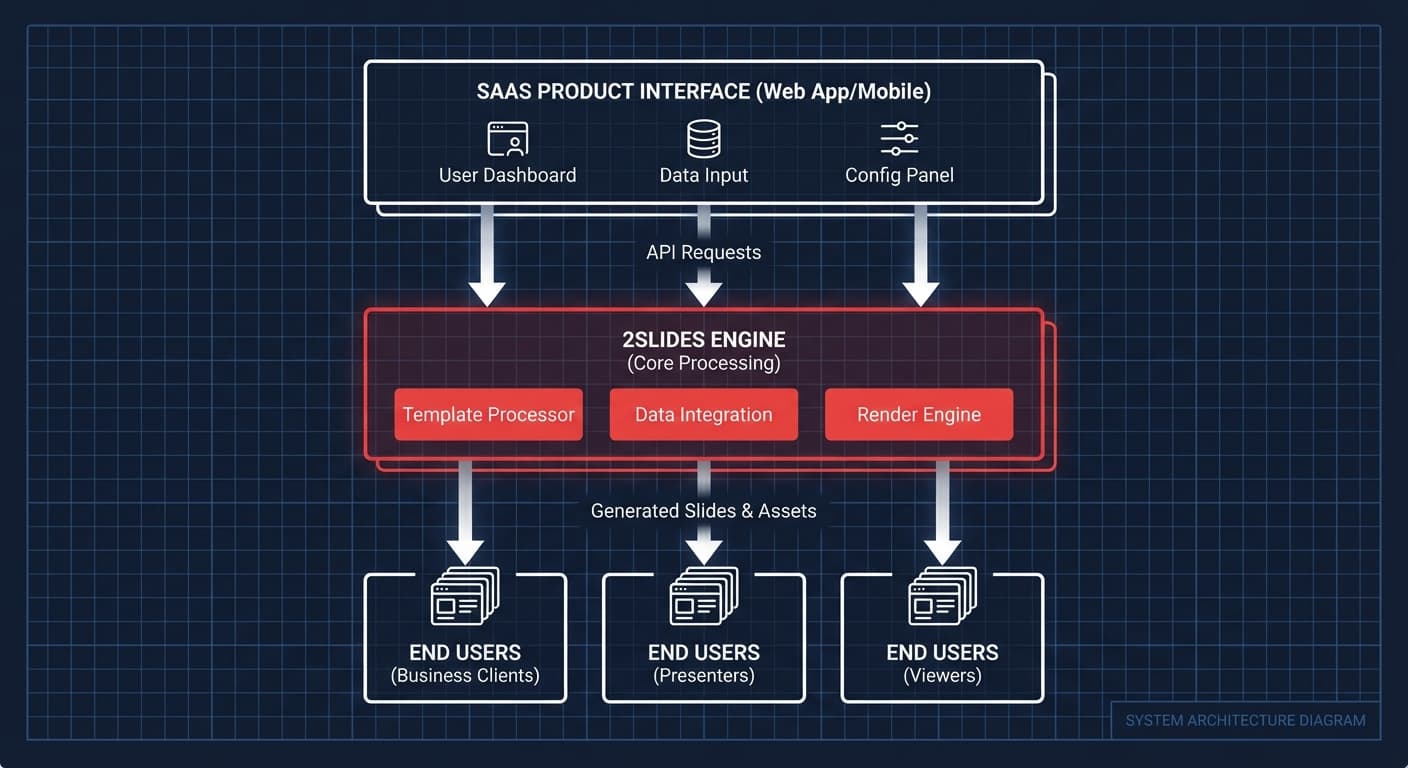
Your SaaS App
    ↓ (ผู้ใช้กระตุ้นการสร้างงานนำเสนอ)
Your Backend Server
    ↓ (เรียก API พร้อม API key ของ 2Slides)
2Slides API
    ↓ (ประมวลผลงานแบบอะซิงโครนัส)
Your Backend Server (สำรวจความคืบหน้า)
    ↓ (ส่งคืน URL ดาวน์โหลดให้ผู้ใช้)
Your SaaS App (ผู้ใช้ดาวน์โหลดหรือดูสไลด์)สำคัญ: อย่าเปิดเผย API key ของ 2Slides ไปยังไคลเอนต์ การเรียก API ทั้งหมดควรผ่าน backend ของคุณ
// Backend endpoint ของคุณ
app.post('/api/generate-presentation', async (req, res) => {
  const { topic, dataContext, userId } = req.body;

  // ตรวจสอบสิทธิ์ผู้ใช้และยอดเครดิต
  const user = await getUser(userId);
  if (!user.canGenerateSlides) {
    return res.status(403).json({ error: 'Presentation generation not available' });
  }

  // เรียก 2Slides API จากเซิร์ฟเวอร์ของคุณ
  const job = await fetch('https://2slides.com/api/v1/slides/generate', {
    method: 'POST',
    headers: {
      'Authorization': `Bearer ${process.env.TWOSLIDES_API_KEY}`,
      'Content-Type': 'application/json'
    },
    body: JSON.stringify({
      userInput: topic,
      themeId: user.preferredTheme,
      mode: 'async'
    })
  }).then(r => r.json());

  // บันทึกการอ้างอิงงานในฐานข้อมูลของคุณ
  await saveJob(userId, job.jobId);

  res.json({ jobId: job.jobId, status: 'processing' });
});รวมเครดิตการสร้างงานนำเสนอเข้ากับแผนบริการที่มีอยู่:
ขายการสร้างงานนำเสนอแยกเป็นส่วนเสริม:
โอนค่าใช้จ่ายพร้อมกำไรส่วนเพิ่ม:
กำหนดธีมที่แตกต่างกันให้กับลูกค้าแต่ละราย:
const customerThemes = {
  'acme-corp': 'mckinsey-theme-id',
  'startup-xyz': 'apple-theme-id',
  'enterprise-inc': 'corporate-theme-id'
};เก็บภาพอ้างอิงแบรนด์ของลูกค้าแต่ละรายและใช้สำหรับงานนำเสนอทั้งหมดของพวกเขา:
const brandAssets = await getBrandAssets(customerId);
// ใช้สไลด์แบรนด์ของลูกค้าเป็นข้อมูลอ้างอิงสำหรับงานนำเสนอทั้งหมดของพวกเขาเคารพการตั้งค่าภาษาของลูกค้าแต่ละราย:
const language = customer.locale || 'en'; // รองรับมากกว่า 22 ภาษาได้ — ไฟล์ PowerPoint ที่สร้างขึ้นไม่มีแบรนด์ 2Slides ปรากฏเป็นไฟล์ .pptx มาตรฐานที่ผู้ใช้สามารถแก้ไขใน PowerPoint ได้
ใช้การลดทอนอย่างสง่างาม — แสดงข้อความ "การสร้างไม่สามารถใช้งานได้ชั่วคราว" ให้ผู้ใช้เห็นและจัดคิวคำขอเพื่อลองใหม่
ได้ — API key หนึ่งตัวให้บริการแพลตฟอร์มทั้งหมดของคุณ ติดตามการใช้งานต่อลูกค้าในระบบของคุณเอง
เพิ่มการสร้างงานนำเสนอให้กับผลิตภัณฑ์ของคุณ — รับการเข้าถึง API ที่ 2Slides
Create stunning AI-powered presentations in seconds. Transform your ideas into professional slides with 2slides AI Agent.
Try For FreeYour AI Agent for slides. Save time, shine faster with intelligent presentation creation.




© 2026 2slides. All rights reserved.